Bug: KB explainer demo truncates the "Entity" stage on mobile (≤390px viewport)
Where
Landing page → "How it works" section → "Knowledge base" row (KbExplainerDemo)
File: components/landing/motion/kb-explainer-demo.tsx
What
On mobile viewports (iPhone SE 375px, iPhone 14 390px) the KB ingest pipeline row inside the explainer card overflows the document's right edge. The 5th stage box (Entity) gets pushed beyond the visible area and is cut off.
Measured overflow:
- iPhone SE (375×667):
Entity stage overflows document right by +25.1 px
- iPhone 14 (390×844): overflows by +10.1 px
- iPhone 14 Pro Max (430×932): no overflow ✅
The 4 sibling stage boxes (PDF / OCR / CHUNK / EMBED) plus 4 arrow icons + gap-1.5 are laid out in a single non-wrapping flex row that always renders 5 stage tiles — but the container width on mobile isn't enough to fit all 5.
Repro
pnpm dev on main- Open
http://localhost:3000/ in a mobile-sized viewport (Chrome DevTools → iPhone SE / iPhone 14)
- Scroll to "How it works" → "Knowledge base" row
- Observe the demo card: only 4 stage boxes visible,
Entity missing
Screenshots
iPhone SE 375px — 5th stage box (Entity) clipped off the right edge:
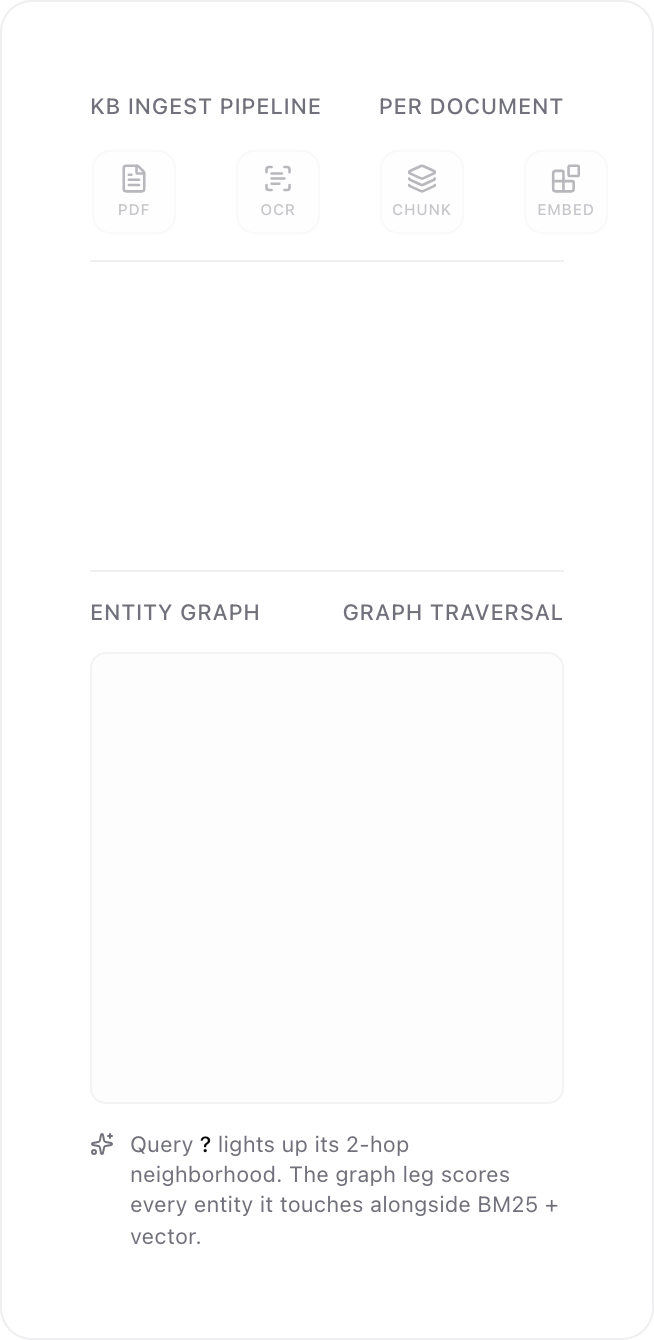
iPhone 14 390px — same bug, smaller overflow:

Root cause (locator, not the fix)
components/landing/motion/kb-explainer-demo.tsx:281 — the pipeline row uses a non-wrapping flex container:
<div className="flex items-center justify-between gap-1.5">
  {STAGES.map((stage, i) => (
    <Fragment key={stage.id}>
      <StageBox stage={stage} lit={i < pipelineLit} />
      {i < STAGES.length - 1 && <ArrowRightIcon … />}
    </Fragment>
  ))}
</div>
With 5 stages + 4 arrows + gap-1.5 + size-11 (44px) per stage box, the row needs ~336px minimum; on a 343px-wide card on a 375px viewport there isn't enough room, so the last item spills past the document edge.
Suggested fix directions (left to maintainer)
- Wrap pipeline row to 2 lines on narrow viewports (e.g.
flex-wrap + smaller arrows, or a 2-row grid)
- Drop the
Entity stage from this row and re-use it as the connector into the "Entity graph" panel below
- Hide stage labels below a breakpoint and rely on the icon + tooltip
Not filing the fix — just the report. Repro and locator should be enough for whoever picks it up.
Bug: KB explainer demo truncates the "Entity" stage on mobile (≤390px viewport)
Where
Landing page → "How it works" section → "Knowledge base" row (
KbExplainerDemo)File:
components/landing/motion/kb-explainer-demo.tsxWhat
On mobile viewports (iPhone SE 375px, iPhone 14 390px) the KB ingest pipeline row inside the explainer card overflows the document's right edge. The 5th stage box (
Entity) gets pushed beyond the visible area and is cut off.Measured overflow:
Entitystage overflows document right by +25.1 pxThe 4 sibling stage boxes (
PDF / OCR / CHUNK / EMBED) plus 4 arrow icons +gap-1.5are laid out in a single non-wrappingflexrow that always renders 5 stage tiles — but the container width on mobile isn't enough to fit all 5.Repro
pnpm devonmainhttp://localhost:3000/in a mobile-sized viewport (Chrome DevTools → iPhone SE / iPhone 14)EntitymissingScreenshots
iPhone SE 375px — 5th stage box (

Entity) clipped off the right edge:iPhone 14 390px — same bug, smaller overflow:

Root cause (locator, not the fix)
components/landing/motion/kb-explainer-demo.tsx:281— the pipeline row uses a non-wrappingflexcontainer:With 5 stages + 4 arrows +
gap-1.5+size-11(44px) per stage box, the row needs ~336px minimum; on a 343px-wide card on a 375px viewport there isn't enough room, so the last item spills past the document edge.Suggested fix directions (left to maintainer)
flex-wrap+ smaller arrows, or a 2-row grid)Entitystage from this row and re-use it as the connector into the "Entity graph" panel belowNot filing the fix — just the report. Repro and locator should be enough for whoever picks it up.