
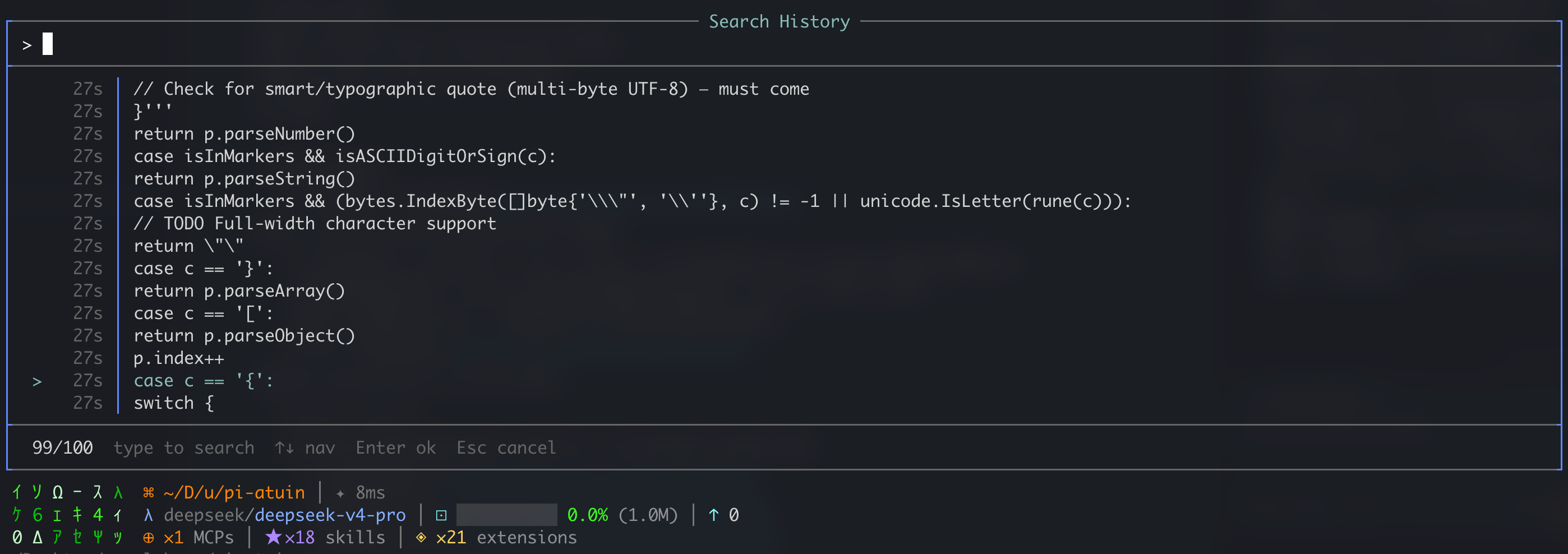
Atuin-style fuzzy history search for Pi
Press ↑ to search previous prompts with fuzzy matching. Backed by atuin DB + local JSONL.
pi install npm:pi-atuinOr from source:
git clone https://github.com/RealAlexandreAI/pi-atuin.git
cd pi-atuin && pi install .# Install atuin (if not already)
curl --proto '=https' --tlsv1.2 -LsSf https://setup.atuin.sh | sh
# Register / login
atuin register -u <username> -e <email>pi-atuin records history into atuin automatically — no atuin hook install pi needed. That hook registers a conflicting bash tool and breaks extensions like pi-tool-display.
If you previously ran atuin hook install pi, remove the hook extension:
rm ~/.pi/agent/extensions/atuin.ts
pi /reload
With atuin installed, history syncs bidirectionally. Search in either pi (↑) or your shell (atuin search).
No setup needed. Pi prompts are stored in ~/.pi/agent/pi-history.jsonl.
| Source | JSONL (↑ search) | Atuin DB |
|---|---|---|
| Your pi prompts | Yes | Yes |
Agent bash tool calls |
No | Yes (default on) |
Your ! shell commands |
No | Yes |
- Prompts always go to JSONL and atuin (when installed).
- Agent bash is recorded to atuin only (not mixed into ↑ prompt search). On by default;
/atuin record-agent-historytoggles it. !commands are your direct shell input in pi — tracked in atuin, not JSONL.
- Press ↑ when the input is empty
- Type to fuzzy-filter
- ↑↓ to navigate, Enter to select, Esc to cancel
/atuin record-agent-history # toggle agent bash → atuin, shows on/off
Settings persist in ~/.pi/agent/extensions/pi-atuin/config.json.
- History file permissions:
600(owner-only) - Max 1,000 JSONL entries, auto-trimmed
- Atuin calls use
execFile/pi.exec(no shell injection) - No hardcoded credentials or keys
MIT
Built for Pi Coding Agent. Inspired by atuin.