



PyRTL provides a collection of classes for Pythonic register-transfer level design, simulation, tracing, and testing suitable for teaching and research. Simplicity, usability, clarity, and extensibility are overarching goals, rather than performance or optimization. Features include:
- Elaboration-through-execution, meaning all of Python can be used including introspection.
- Design, instantiate, and simulate all in one file and without leaving Python.
- Export to, or import from, common HDLs (BLIF-in, Verilog-out currently supported).
- Examine execution with waveforms on the terminal or export to
.vcdas projects scale. - Elaboration, synthesis, and basic optimizations all included.
- Small and well-defined internal core structure means writing new transforms is easier.
- Batteries included means many useful components are already available.
What README would be complete without a screenshot? Below you can see the waveform rendered right on the terminal for a small state machine written in PyRTL.
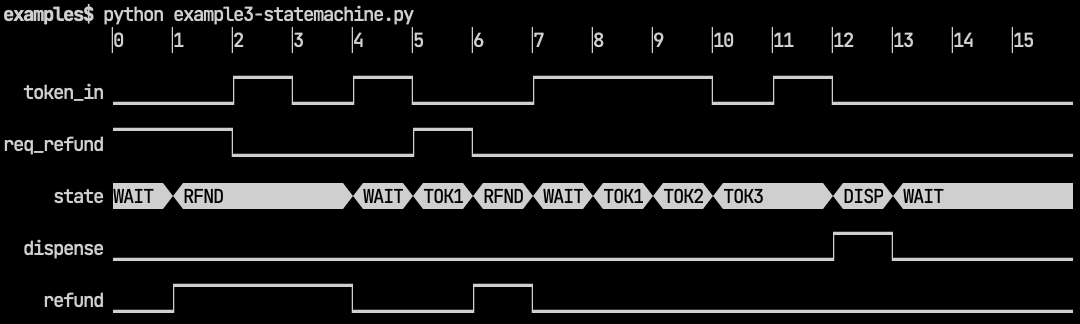
- For users, more info and demo code is available on the PyRTL project web page.
- Try the examples in the
examplesdirectory. You can also try the examples on MyBinder. - Full reference documentation is available.
If you are just getting started with PyRTL, try starting with the
examples to
get a sense of the "thinking with PyRTLs" required to design hardware in this
way. If you are looking for a deeper understanding, dive into the code for the
object Block. It
is the core data structure at the heart of PyRTL and defines its semantics at a
high level -- everything is converted to or from the small, simple set of
primitives defined there.
The package contains the following files and directories:
pyrtlThe module's source code.pyrtl/rtllib/Finished PyRTL libraries which are hopefully both useful and documented.examplesA set of hardware design examples that show the main ideas behind PyRTL.testsA set of unit tests for PyRTL which you can run withpytest.docsDocumentation written in Sphinx reStructuredText.
All PyRTL developers should use the same tool versions to avoid confusing situations where a test fails only on one person's computer, or the generated documentation looks weird on another person's computer.
PyRTL uses uv to ensure all developers work in
the same environment. uv manages the installation and versioning for all
other PyRTL developer tools, like pytest and ruff.
To set up a PyRTL development environment, you only need to install uv, by
following the uv installation
instructions.
After installing uv, you can run all the tests
with:
$ uv run just testsAnd you can generate the Sphinx documentation with:
$ uv run just docsuv will download and install Python and any required pip packages as
needed. uv caches installed software so future uv invocations will be fast.
Picking a first project
- One of the earliest things you should submit is a unit test that hits some
uncovered lines of code in
PyRTL. For
example, pick a
PyrtlErrorthat is not covered and add a unit test inteststhat will hit it. - After you have that down check PyRTL Issues for a feature that is marked as "beginner friendly".
- Once you have that down, ask for access to the PyRTL-research repo where we keep experimental features and designs that could use more help!
Coding style
- All major functionality should have unit tests covering and documenting their use.
- All public functions and methods should have useful docstrings.
- All code needs to conform to PEP8 conventions.
- No new root-level dependencies on external libs, import locally if required for special functions.
Workflow
-
This Git tutorial is a useful reference for working with Git.
-
This blog post covers a useful Git Fork workflow for working on PyRTL.
-
The
developmentbranch is the primary stable working branch (everyone is invited to submit pull requests)., -
Bugs and minor enhancements tracked directly through GitHub Issues.
-
When posting a bug please include a small code sample that triggers the bug, e.g. Issue #56.
-
When pushing a fix to a bug or enhancement please reference the Issue in the commit message, e.g. Fix to Issue #56.
-
Before sending a pull request, please run:
$ uv run just presubmit
to verify that all tests pass and that all documentation can be generated with your changes.
Documentation
-
All important functionality should have an executable example in
examples. -
All classes should have a docstring that describes the class at a high level.
-
All methods and functions should include a docstring in the following Sphinx-parsable format:
"""One Line Summary (< 88 chars) of the function, followed by period.

A longer description of what this function does and does not do. Describe any
assumptions or invariants. Provide an example for user-facing functions.

:param param1: Description of this parameter.
:param param2: Longer parameter descriptions take up a newline with four
    leading spaces like this.

:raises Exception: If this function raises an exception, explain when that
    occurs here.

:return: Description of function's return value.
"""
-
Sphinx parses Python type annotations, so put type information into annotations instead of docstrings.
-
The Sphinx-generated documentation is published to https://pyrtl.readthedocs.io/ .
-
PyRTL's Sphinx build process is documented in
docs/README.md. -
PyRTL's release process is documented in
docs/release/README.md.
We love to hear from users about their projects, and if there are issues we will try our best to push fixes quickly. You can read more about how we have been using it in our research at UCSB both in simulation and on FPGAs in our PyRTL paper at FPL.
It is always important to point out that PyRTL builds on the ideas of several other related projects as we all share the common goal of trying to make hardware design a better experience! You can read more about those relationships on our PyRTL project web page.