Fix CSD Unit 2 Web Lab 2 copy issues#73772
Conversation

 ebeastlake
force-pushed
the
task/csd2-weblab2-copy-source-fixes
branch
3 times, most recently
from
ebeastlake
force-pushed
the
task/csd2-weblab2-copy-source-fixes
branch
3 times, most recently
from
9366319 to
fab7809
Compare

 ebeastlake
left a comment
ebeastlake
left a comment
ebeastlake
left a comment
There was a problem hiding this comment.
Inline minimal diffs for the Web Lab 2 copy/source edits.
ebeastlake
force-pushed
the
task/csd2-weblab2-copy-source-fixes
branch
from
fab7809 to
cd7ad72
Compare
ebeastlake
left a comment
ebeastlake
left a comment
There was a problem hiding this comment.
Inline minimal diffs for the Web Lab 2 copy/source edits.
ebeastlake
left a comment
ebeastlake
left a comment
There was a problem hiding this comment.
Inline minimal diffs for Web Lab 2 copy/source edits (1-20).
ebeastlake
left a comment
ebeastlake
left a comment
There was a problem hiding this comment.
Inline minimal diffs for Web Lab 2 copy/source edits (21-40).
This comment was marked as outdated.
This comment was marked as outdated.
Sorry, something went wrong.
| "properties": { | ||
| "encrypted": "false", | ||
| "long_instructions": "# Div + Flex\r\n\r\nThe HTML division tag, called \"div\" for short, is a special element that lets you group similar sets of content together on a web page inside a container. It is a multi-purpose tag that you can use to do several things including helping with web layouts and CSS. Ultimately, you'll almost always use it to style whatever it contains.\r\n\r\nFlexbox gives us a more efficient way to align and distribute space among items in a `div` container, even when their size is unknown and/or dynamic (thus the word \"flex\"). \r\n\r\n## Do This\r\n\r\n1) Take a look at the web page below and notice the `div` container around the images.\r\n2) Go look at the CSS file and notice the flex properites applied to the `div`.\r\n3) Discuss with your neighbor: What do you think each of the properties applied to the `div` tag does to the webpage layout?\r\n - Try using the CSS comment out code `/* */` to comment out one line at a time to see what happens to the layout.\r\n - **For example:**\r\n - _Add CSS comments to the first property which will look like this: `/* display: flex; */`_\r\n - _Then delete those comments and add CSS comments to the next line: `/* flex-direction: row-reverse; */`_\r\n - _Then delete those comments and continue adding CSS comments to each line, one at a time._", | ||
| "long_instructions": "# Div + Flex\r\n\r\nThe HTML division tag, called \"div\" for short, is a special element that lets you group similar sets of content together on a web page inside a container. It is a multi-purpose tag that you can use to do several things including helping with web layouts and CSS. Ultimately, you'll almost always use it to style whatever it contains.\r\n\r\nFlexbox gives us a more efficient way to align and distribute space among items in a `div` container, even when their size is unknown and/or dynamic (thus the word \"flex\"). \r\n\r\n## Do This\r\n\r\n1) Take a look at the web page below and notice the `div` container around the images.\r\n2) Go look at the CSS file and notice the flex properties applied to the `div`.\r\n3) Discuss with your neighbor: What do you think each of the properties applied to the `div` tag does to the webpage layout?\r\n - Use CSS comments, `/* */`, to comment out one line at a time and see what happens to the layout.\r\n - **For example:**\r\n - _Add CSS comments to the first property which will look like this: `/* display: flex; */`_\r\n - _Then delete those comments and add CSS comments to the next line: `/* flex-direction: row-reverse; */`_\r\n - _Then delete those comments and continue adding CSS comments to each line, one at a time._", |
There was a problem hiding this comment.
Minimal diff for properties.long_instructions:
- ... ites applied to the `div`.
+ ... ties applied to the `div`.
- ... - Try using the CSS comment out code `/*   */` to comment out one line at a time...
+ ... - Use CSS comments, `/* */`, to comment out one line at a time...| "properties": { | ||
| "encrypted": "false", | ||
| "long_instructions": "# Div + Flex\r\n\r\nThe HTML division tag, called \"div\" for short, is a special element that lets you group similar sets of content together on a web page inside a container. It is a multi-purpose tag that you can use to do several things including helping with web layouts and CSS. Ultimately, you'll almost always use it to style whatever it contains.\r\n\r\nFlexbox gives us a more efficient way to align and distribute space among items in a `div` container, even when their size is unknown and/or dynamic (thus the word \"flex\"). \r\n\r\n## Do This\r\n\r\n1) Take a look at the web page below and notice the `div` container around the images.\r\n2) Go look at the CSS file and notice the flex properites applied to the `div`.\r\n3) Discuss with your neighbor: What do you think each of the properties applied to the `div` tag does to the webpage layout?\r\n - Try using the CSS comment out code `/* */` to comment out one line at a time to see what happens to the layout.\r\n - **For example:**\r\n - _Add CSS comments to the first property which will look like this: `/* display: flex; */`_\r\n - _Then delete those comments and add CSS comments to the next line: `/* flex-direction: row-reverse; */`_\r\n - _Then delete those comments and continue adding CSS comments to each line, one at a time._", | ||
| "long_instructions": "# Div + Flex\r\n\r\nThe HTML division tag, called \"div\" for short, is a special element that lets you group similar sets of content together on a web page inside a container. It is a multi-purpose tag that you can use to do several things including helping with web layouts and CSS. Ultimately, you'll almost always use it to style whatever it contains.\r\n\r\nFlexbox gives us a more efficient way to align and distribute space among items in a `div` container, even when their size is unknown and/or dynamic (thus the word \"flex\"). \r\n\r\n## Do This\r\n\r\n1) Take a look at the web page below and notice the `div` container around the images.\r\n2) Go look at the CSS file and notice the flex properties applied to the `div`.\r\n3) Discuss with your neighbor: What do you think each of the properties applied to the `div` tag does to the webpage layout?\r\n - Use CSS comments, `/* */`, to comment out one line at a time and see what happens to the layout.\r\n - **For example:**\r\n - _Add CSS comments to the first property which will look like this: `/* display: flex; */`_\r\n - _Then delete those comments and add CSS comments to the next line: `/* flex-direction: row-reverse; */`_\r\n - _Then delete those comments and continue adding CSS comments to each line, one at a time._", |
There was a problem hiding this comment.
Minimal diff for properties.long_instructions:
- ... ites applied to the `div`.
+ ... ties applied to the `div`.
- ... - Try using the CSS comment out code `/*   */` to comment out one line at a time...
+ ... - Use CSS comments, `/* */`, to comment out one line at a time...| "properties": { | ||
| "encrypted": "false", | ||
| "long_instructions": "# Making a Multi-page Site\r\n\r\n\r\n\r\nA web site should include more than one web page, and they should connect to each other. Here's an example of a project with multiple pages that are connected by hyperlinks (the blue underlined words that take you to another page when you click on them).\r\n\r\n# Do This\r\n1) Use the inspector tool to see the code that creates the hyperlinks on the top of index.html.\r\n* Discuss with your partner how you think that code works.\r\n", | ||
| "long_instructions": "# Making a Multi-page Site\r\n\r\n\r\n\r\nA web site should include more than one web page, and they should connect to each other. Here's an example of a project with multiple pages that are connected by hyperlinks (the blue underlined words that take you to another page when you click on them).\r\n\r\n# Do This\r\n1) Look at the top of `index.html` to see the code that creates the hyperlinks.\r\n* Discuss with your partner how you think that code works.\r\n", |
There was a problem hiding this comment.
Minimal diff for properties.long_instructions:
- ... 1) Use the inspector tool to see the code that creates the hyperlinks...
+ ... 1) Look at the top of `index.html` to see the code that creates the hyperlinks...| "properties": { | ||
| "encrypted": "false", | ||
| "long_instructions": "# Making a Multi-page Site\r\n\r\n\r\n\r\nA web site should include more than one web page, and they should connect to each other. Here's an example of a project with multiple pages that are connected by hyperlinks (the blue underlined words that take you to another page when you click on them).\r\n\r\n# Do This\r\n1) Use the inspector tool to see the code that creates the hyperlinks on the top of index.html.\r\n* Discuss with your partner how you think that code works.\r\n", | ||
| "long_instructions": "# Making a Multi-page Site\r\n\r\n\r\n\r\nA web site should include more than one web page, and they should connect to each other. Here's an example of a project with multiple pages that are connected by hyperlinks (the blue underlined words that take you to another page when you click on them).\r\n\r\n# Do This\r\n1) Look at the top of `index.html` to see the code that creates the hyperlinks.\r\n* Discuss with your partner how you think that code works.\r\n", |
There was a problem hiding this comment.
Minimal diff for properties.long_instructions:
- ... 1) Use the inspector tool to see the code that creates the hyperlinks...
+ ... 1) Look at the top of `index.html` to see the code that creates the hyperlinks...| "properties": { | ||
| "encrypted": "false", | ||
| "long_instructions": "# Anchor Tag States\r\n\r\nAn anchor (`<a>`) tag has four states:\r\n1. **link**: when the link has not yet been clicked\r\n2. **visited**: when the link has been clicked (clicking a link \"visits\" that linked page, hence the name \"visited\")\r\n3. **hover**: when the mouse is hovered over, but not clicked, the link\r\n4. **active**: the moment the mouse is actively clicking down on the link\r\n\r\nWe style these states using pseudo-classes. In the example below, we specify the anchor element selector, a colon, and the name of the anchor state:\r\n\r\n```\r\na:hover {\r\n color: yellow;\r\n}\r\n```\r\n\r\nLet's give the first two states a try!\r\n\r\n# Do This\r\n\r\n**In the CSS file:**\r\n1. Add a rule to style the \"link\" state of the `<a>` element.\r\n - The selector of your rule should look like this: `a:link`\r\n - Add the `color` property with a value of your choice.\r\n - This will define what your link looks like when it has not been clicked - Add any other properties of your choice.\r\n\r\n<br>\r\n\r\n2. Add a rule to style the \"visited\" state of the `<a>` element.\r\n - The selector of your rule should look like this: `a:visited`\r\n - Add the `color` property with a different color than the \"link\" state.\r\n - This will define what your link looks like when it has been clicked - Add any other properties of your choice.\r\n\r\n**In the Preview Window:**\r\n1. Click on the link. A new tab with \"google.com\" should open. Come back to Web Lab to see the changes to the look of your link.\r\n - *You may need to click the \"Refresh and Save\" button to see the \"visited\" style applied to your hyperlink*\r\n\r\n<br>\r\n\r\n::: details [🔎 **Show Me How To Get Started** 🔍]\r\n\r\n<img src=\"https://images.code.org/c4c850b4e8f10814b57afae9a9ee141f-image-1708196522992.gif\" style=\"width:500px\">\r\n:::\r\n\r\n<br>\r\n\r\n::: details [Help & Tips]\r\n- [<i class=\"fa-regular fa-map\"></i> Pseudo Classes](https://studio.code.org/courses/csd-2024/guides/pseudo-classes)\r\n- [<i class=\"fa-solid fa-book\"></i> Hyperlinks](https://studio.code.org/courses/csd-2024/guides/hyperlinks)\r\n- [<i class=\"fa-solid fa-book\"></i> Flex Children](https://studio.code.org/courses/csd-2024/guides/flex-children)\r\n- [<i class=\"fa-solid fa-book\"></i> Flexbox](https://studio.code.org/courses/csd-2024/guides/flexbox)\r\n- [<i class=\"fa-solid fa-book\"></i> HTML Selectors](https://studio.code.org/courses/csd-2024/guides/html-selectors)\r\n- [<i class=\"fa-solid fa-book\"></i> Div Tags](https://studio.code.org/courses/csd-2024/guides/div)\r\n- [<i class=\"fa-solid fa-book\"></i> Classes](https://studio.code.org/courses/csd-2024/guides/classes)\r\n- [<i class=\"fa-solid fa-book\"></i> Layout Properties](https://studio.code.org/courses/csd-2024/guides/layout-properties)\r\n- [<i class=\"fa-solid fa-book\"></i> Body Styling](https://studio.code.org/courses/csd-2024/guides/body-styling)\r\n- [<i class=\"fa-solid fa-book\"></i> Images in HTML](https://studio.code.org/courses/csd-2024/guides/images-in-html)\r\n- [<i class=\"fa-solid fa-book\"></i> Text Properties](https://studio.code.org/courses/csd-2024/guides/text-properties)\r\n- [<i class=\"fa-solid fa-book\"></i> Creative Commons Search](https://studio.code.org/courses/csd-2024/guides/creative-commons-search)\r\n- [<i class=\"fa-solid fa-book\"></i> Style Sheets](https://studio.code.org/courses/csd-2024/guides/style-sheets)\r\n- [<i class=\"fa-solid fa-book\"></i> Formatting HTML](https://studio.code.org/courses/csd-2024/guides/formatting-html)\r\n- [<i class=\"fa-solid fa-book\"></i> Formatting HTML](https://studio.code.org/courses/csd-2024/guides/formatting-html)\r\n- [<i class=\"fa-solid fa-book\"></i> Lists](https://studio.code.org/courses/csd-2024/guides/lists)\r\n- [<i class=\"fa-solid fa-book\"></i> Headings and Paragraphs](https://studio.code.org/courses/csd-2024/guides/headings-and-paragraphs)\r\n- [<i class=\"fa-solid fa-book\"></i> HTML Tags](https://studio.code.org/courses/csd-2024/guides/html-tags)\r\n- [<i class=\"fa-solid fa-book\"></i> Debugging in HTML](https://studio.code.org/courses/csd-2022/guides/debugging-html)\r\n:::", | ||
| "long_instructions": "# Anchor Tag States\r\n\r\nAn anchor (`<a>`) tag has four states:\r\n1. **link**: when the link has not yet been clicked\r\n2. **visited**: when the link has been clicked (clicking a link \"visits\" that linked page, hence the name \"visited\")\r\n3. **hover**: when the mouse is hovered over, but not clicked, the link\r\n4. **active**: the moment the mouse is actively clicking down on the link\r\n\r\nWe style these states using pseudo-classes. In the example below, we specify the anchor element selector, a colon, and the name of the anchor state:\r\n\r\n```\r\na:hover {\r\n color: yellow;\r\n}\r\n```\r\n\r\nLet's give the first two states a try!\r\n\r\n# Do This\r\n\r\n**In the CSS file:**\r\n1. Add a rule to style the \"link\" state of the `<a>` element.\r\n - The selector of your rule should look like this: `a:link`\r\n - Add the `color` property with a value of your choice.\r\n - This will define what your link looks like when it has not been clicked - Add any other properties of your choice.\r\n\r\n<br>\r\n\r\n2. Add a rule to style the \"visited\" state of the `<a>` element.\r\n - The selector of your rule should look like this: `a:visited`\r\n - Add the `color` property with a different color than the \"link\" state.\r\n - This will define what your link looks like when it has been clicked - Add any other properties of your choice.\r\n\r\n**In the Preview Window:**\r\n1. Click on the link. A new tab with \"google.com\" should open. Come back to Web Lab to see the changes to the look of your link.\r\n\r\n<br>\r\n\r\n::: details [🔎 **Show Me How To Get Started** 🔍]\r\n\r\n<img src=\"https://images.code.org/c4c850b4e8f10814b57afae9a9ee141f-image-1708196522992.gif\" style=\"width:500px\">\r\n:::\r\n\r\n<br>\r\n\r\n::: details [Help & Tips]\r\n- [<i class=\"fa-regular fa-map\"></i> Pseudo Classes](https://studio.code.org/courses/csd-2024/guides/pseudo-classes)\r\n- [<i class=\"fa-solid fa-book\"></i> Hyperlinks](https://studio.code.org/courses/csd-2024/guides/hyperlinks)\r\n- [<i class=\"fa-solid fa-book\"></i> Flex Children](https://studio.code.org/courses/csd-2024/guides/flex-children)\r\n- [<i class=\"fa-solid fa-book\"></i> Flexbox](https://studio.code.org/courses/csd-2024/guides/flexbox)\r\n- [<i class=\"fa-solid fa-book\"></i> HTML Selectors](https://studio.code.org/courses/csd-2024/guides/html-selectors)\r\n- [<i class=\"fa-solid fa-book\"></i> Div Tags](https://studio.code.org/courses/csd-2024/guides/div)\r\n- [<i class=\"fa-solid fa-book\"></i> Classes](https://studio.code.org/courses/csd-2024/guides/classes)\r\n- [<i class=\"fa-solid fa-book\"></i> Layout Properties](https://studio.code.org/courses/csd-2024/guides/layout-properties)\r\n- [<i class=\"fa-solid fa-book\"></i> Body Styling](https://studio.code.org/courses/csd-2024/guides/body-styling)\r\n- [<i class=\"fa-solid fa-book\"></i> Images in HTML](https://studio.code.org/courses/csd-2024/guides/images-in-html)\r\n- [<i class=\"fa-solid fa-book\"></i> Text Properties](https://studio.code.org/courses/csd-2024/guides/text-properties)\r\n- [<i class=\"fa-solid fa-book\"></i> Creative Commons Search](https://studio.code.org/courses/csd-2024/guides/creative-commons-search)\r\n- [<i class=\"fa-solid fa-book\"></i> Style Sheets](https://studio.code.org/courses/csd-2024/guides/style-sheets)\r\n- [<i class=\"fa-solid fa-book\"></i> Formatting HTML](https://studio.code.org/courses/csd-2024/guides/formatting-html)\r\n- [<i class=\"fa-solid fa-book\"></i> Formatting HTML](https://studio.code.org/courses/csd-2024/guides/formatting-html)\r\n- [<i class=\"fa-solid fa-book\"></i> Lists](https://studio.code.org/courses/csd-2024/guides/lists)\r\n- [<i class=\"fa-solid fa-book\"></i> Headings and Paragraphs](https://studio.code.org/courses/csd-2024/guides/headings-and-paragraphs)\r\n- [<i class=\"fa-solid fa-book\"></i> HTML Tags](https://studio.code.org/courses/csd-2024/guides/html-tags)\r\n- [<i class=\"fa-solid fa-book\"></i> Debugging in HTML](https://studio.code.org/courses/csd-2022/guides/debugging-html)\r\n:::", |
There was a problem hiding this comment.
Minimal diff for properties.long_instructions:
- ... - *You may need to click the "Refresh and Save" button to see the "visited" style applied to your hyperlink*
+ ...| "encrypted": "false", | ||
| "display_name": "Debug - Pseudo-classes", | ||
| "long_instructions": "# Debugging Pseudo-classes\r\n\r\nHelp! Lorenzo is trying to style the hyperlink so that the font gets larger and has a different color when you hover over it. But it isn't working. Please help him by finding and fixing the bugs!\r\n\r\nWhat I expected to happen |\t What happened instead\r\n----------|----------------\r\n**Each link has its own style and each link's style changes when you hover over them.** | _The links don't have the defined \"link\" state style and their \"hover\" styles aren't working._\r\n\r\n\r\n# Do This\r\n\r\n1. Find and fix any bugs so that the hover pseudo-class will work appropriately!\r\n\r\n**Don't forget to click \"Refresh and Save\" to see if everything is working as expected.**\r\n\r\n<br>\r\n\r\n::: details [Help & Tips]\r\n- [<i class=\"fa-regular fa-map\"></i> Pseudo Classes](https://studio.code.org/courses/csd-2024/guides/pseudo-classes)\r\n- [<i class=\"fa-solid fa-book\"></i> Hyperlinks](https://studio.code.org/courses/csd-2024/guides/hyperlinks)\r\n- [<i class=\"fa-solid fa-book\"></i> Flex Children](https://studio.code.org/courses/csd-2024/guides/flex-children)\r\n- [<i class=\"fa-solid fa-book\"></i> Flexbox](https://studio.code.org/courses/csd-2024/guides/flexbox)\r\n- [<i class=\"fa-solid fa-book\"></i> HTML Selectors](https://studio.code.org/courses/csd-2024/guides/html-selectors)\r\n- [<i class=\"fa-solid fa-book\"></i> Div Tags](https://studio.code.org/courses/csd-2024/guides/div)\r\n- [<i class=\"fa-solid fa-book\"></i> Classes](https://studio.code.org/courses/csd-2024/guides/classes)\r\n- [<i class=\"fa-solid fa-book\"></i> Layout Properties](https://studio.code.org/courses/csd-2024/guides/layout-properties)\r\n- [<i class=\"fa-solid fa-book\"></i> Body Styling](https://studio.code.org/courses/csd-2024/guides/body-styling)\r\n- [<i class=\"fa-solid fa-book\"></i> Images in HTML](https://studio.code.org/courses/csd-2024/guides/images-in-html)\r\n- [<i class=\"fa-solid fa-book\"></i> Text Properties](https://studio.code.org/courses/csd-2024/guides/text-properties)\r\n- [<i class=\"fa-solid fa-book\"></i> Creative Commons Search](https://studio.code.org/courses/csd-2024/guides/creative-commons-search)\r\n- [<i class=\"fa-solid fa-book\"></i> Style Sheets](https://studio.code.org/courses/csd-2024/guides/style-sheets)\r\n- [<i class=\"fa-solid fa-book\"></i> Formatting HTML](https://studio.code.org/courses/csd-2024/guides/formatting-html)\r\n- [<i class=\"fa-solid fa-book\"></i> Formatting HTML](https://studio.code.org/courses/csd-2024/guides/formatting-html)\r\n- [<i class=\"fa-solid fa-book\"></i> Lists](https://studio.code.org/courses/csd-2024/guides/lists)\r\n- [<i class=\"fa-solid fa-book\"></i> Headings and Paragraphs](https://studio.code.org/courses/csd-2024/guides/headings-and-paragraphs)\r\n- [<i class=\"fa-solid fa-book\"></i> HTML Tags](https://studio.code.org/courses/csd-2024/guides/html-tags)\r\n- [<i class=\"fa-solid fa-book\"></i> Debugging in HTML](https://studio.code.org/courses/csd-2022/guides/debugging-html)\r\n:::", | ||
| "long_instructions": "# Debugging Pseudo-classes\r\n\r\nHelp! Lorenzo is trying to style the hyperlink so that the font gets larger and has a different color when you hover over it. But it isn't working. Please help him by finding and fixing the bugs!\r\n\r\nWhat I expected to happen |\t What happened instead\r\n----------|----------------\r\n**Each link has its own style and each link's style changes when you hover over them.** | _The links don't have the defined \"link\" state style and their \"hover\" styles aren't working._\r\n\r\n\r\n# Do This\r\n\r\n1. Find and fix any bugs so that the hover pseudo-class will work appropriately!\r\n\r\n**Use the preview to see if everything is working as expected.**\r\n\r\n<br>\r\n\r\n::: details [Help & Tips]\r\n- [<i class=\"fa-regular fa-map\"></i> Pseudo Classes](https://studio.code.org/courses/csd-2024/guides/pseudo-classes)\r\n- [<i class=\"fa-solid fa-book\"></i> Hyperlinks](https://studio.code.org/courses/csd-2024/guides/hyperlinks)\r\n- [<i class=\"fa-solid fa-book\"></i> Flex Children](https://studio.code.org/courses/csd-2024/guides/flex-children)\r\n- [<i class=\"fa-solid fa-book\"></i> Flexbox](https://studio.code.org/courses/csd-2024/guides/flexbox)\r\n- [<i class=\"fa-solid fa-book\"></i> HTML Selectors](https://studio.code.org/courses/csd-2024/guides/html-selectors)\r\n- [<i class=\"fa-solid fa-book\"></i> Div Tags](https://studio.code.org/courses/csd-2024/guides/div)\r\n- [<i class=\"fa-solid fa-book\"></i> Classes](https://studio.code.org/courses/csd-2024/guides/classes)\r\n- [<i class=\"fa-solid fa-book\"></i> Layout Properties](https://studio.code.org/courses/csd-2024/guides/layout-properties)\r\n- [<i class=\"fa-solid fa-book\"></i> Body Styling](https://studio.code.org/courses/csd-2024/guides/body-styling)\r\n- [<i class=\"fa-solid fa-book\"></i> Images in HTML](https://studio.code.org/courses/csd-2024/guides/images-in-html)\r\n- [<i class=\"fa-solid fa-book\"></i> Text Properties](https://studio.code.org/courses/csd-2024/guides/text-properties)\r\n- [<i class=\"fa-solid fa-book\"></i> Creative Commons Search](https://studio.code.org/courses/csd-2024/guides/creative-commons-search)\r\n- [<i class=\"fa-solid fa-book\"></i> Style Sheets](https://studio.code.org/courses/csd-2024/guides/style-sheets)\r\n- [<i class=\"fa-solid fa-book\"></i> Formatting HTML](https://studio.code.org/courses/csd-2024/guides/formatting-html)\r\n- [<i class=\"fa-solid fa-book\"></i> Formatting HTML](https://studio.code.org/courses/csd-2024/guides/formatting-html)\r\n- [<i class=\"fa-solid fa-book\"></i> Lists](https://studio.code.org/courses/csd-2024/guides/lists)\r\n- [<i class=\"fa-solid fa-book\"></i> Headings and Paragraphs](https://studio.code.org/courses/csd-2024/guides/headings-and-paragraphs)\r\n- [<i class=\"fa-solid fa-book\"></i> HTML Tags](https://studio.code.org/courses/csd-2024/guides/html-tags)\r\n- [<i class=\"fa-solid fa-book\"></i> Debugging in HTML](https://studio.code.org/courses/csd-2022/guides/debugging-html)\r\n:::", |
There was a problem hiding this comment.
Minimal diff for properties.long_instructions:
- ... Don't forget to click "Refresh and Save" to see if everything is working as expected.**
+ ... Use the preview to see if everything is working as expected.**| "properties": { | ||
| "encrypted": "false", | ||
| "long_instructions": "# Adding Pseudo-classes\r\n\r\nMelissa is making this web page about video game development. Can you help her add all four pseudo-class states for her hyperlink?\r\n\r\n# Do This\r\n\r\n1. Add a rule set in the CSS file for each of the pseudo-class states to style the `<a>` element in order to achieve the following styles:\r\n - \"orchid\" color link the same size as the paragraph text\r\n - link turns to the \"whitesmoke\" color with a \"rebeccapurple\" color background and larger text when the mouse hovers over it\r\n - link turns red if the user clicks on it\r\n - link turns \"black\" color with the \"orchid\" color background _as the user clicks_ on it\r\n\r\n**Don't forget to click <i class=\"fa fa-refresh\" aria-hidden=\"true\"></i> to see if everything is working as expected.**\r\n\r\n::: details [Help & Tips]\r\n- [<i class=\"fa-regular fa-map\"></i> Pseudo Classes](https://studio.code.org/courses/csd-2024/guides/pseudo-classes)\r\n- [<i class=\"fa-solid fa-book\"></i> Hyperlinks](https://studio.code.org/courses/csd-2024/guides/hyperlinks)\r\n- [<i class=\"fa-solid fa-book\"></i> Flex Children](https://studio.code.org/courses/csd-2024/guides/flex-children)\r\n- [<i class=\"fa-solid fa-book\"></i> Flexbox](https://studio.code.org/courses/csd-2024/guides/flexbox)\r\n- [<i class=\"fa-solid fa-book\"></i> HTML Selectors](https://studio.code.org/courses/csd-2024/guides/html-selectors)\r\n- [<i class=\"fa-solid fa-book\"></i> Div Tags](https://studio.code.org/courses/csd-2024/guides/div)\r\n- [<i class=\"fa-solid fa-book\"></i> Classes](https://studio.code.org/courses/csd-2024/guides/classes)\r\n- [<i class=\"fa-solid fa-book\"></i> Layout Properties](https://studio.code.org/courses/csd-2024/guides/layout-properties)\r\n- [<i class=\"fa-solid fa-book\"></i> Body Styling](https://studio.code.org/courses/csd-2024/guides/body-styling)\r\n- [<i class=\"fa-solid fa-book\"></i> Images in HTML](https://studio.code.org/courses/csd-2024/guides/images-in-html)\r\n- [<i class=\"fa-solid fa-book\"></i> Text Properties](https://studio.code.org/courses/csd-2024/guides/text-properties)\r\n- [<i class=\"fa-solid fa-book\"></i> Creative Commons Search](https://studio.code.org/courses/csd-2024/guides/creative-commons-search)\r\n- [<i class=\"fa-solid fa-book\"></i> Style Sheets](https://studio.code.org/courses/csd-2024/guides/style-sheets)\r\n- [<i class=\"fa-solid fa-book\"></i> Formatting HTML](https://studio.code.org/courses/csd-2024/guides/formatting-html)\r\n- [<i class=\"fa-solid fa-book\"></i> Formatting HTML](https://studio.code.org/courses/csd-2024/guides/formatting-html)\r\n- [<i class=\"fa-solid fa-book\"></i> Lists](https://studio.code.org/courses/csd-2024/guides/lists)\r\n- [<i class=\"fa-solid fa-book\"></i> Headings and Paragraphs](https://studio.code.org/courses/csd-2024/guides/headings-and-paragraphs)\r\n- [<i class=\"fa-solid fa-book\"></i> HTML Tags](https://studio.code.org/courses/csd-2024/guides/html-tags)\r\n- [<i class=\"fa-solid fa-book\"></i> Debugging in HTML](https://studio.code.org/courses/csd-2022/guides/debugging-html)\r\n:::", | ||
| "long_instructions": "# Adding Pseudo-classes\r\n\r\nMelissa is making this web page about video game development. Can you help her add all four pseudo-class states for her hyperlink?\r\n\r\n# Do This\r\n\r\n1. Add a rule set in the CSS file for each of the pseudo-class states to style the `<a>` element in order to achieve the following styles:\r\n - \"orchid\" color link the same size as the paragraph text\r\n - link turns to the \"whitesmoke\" color with a \"rebeccapurple\" color background and larger text when the mouse hovers over it\r\n - link turns red if the user clicks on it\r\n - link turns \"black\" color with the \"orchid\" color background _as the user clicks_ on it\r\n\r\n**Use the preview to see if everything is working as expected.**\r\n\r\n::: details [Help & Tips]\r\n- [<i class=\"fa-regular fa-map\"></i> Pseudo Classes](https://studio.code.org/courses/csd-2024/guides/pseudo-classes)\r\n- [<i class=\"fa-solid fa-book\"></i> Hyperlinks](https://studio.code.org/courses/csd-2024/guides/hyperlinks)\r\n- [<i class=\"fa-solid fa-book\"></i> Flex Children](https://studio.code.org/courses/csd-2024/guides/flex-children)\r\n- [<i class=\"fa-solid fa-book\"></i> Flexbox](https://studio.code.org/courses/csd-2024/guides/flexbox)\r\n- [<i class=\"fa-solid fa-book\"></i> HTML Selectors](https://studio.code.org/courses/csd-2024/guides/html-selectors)\r\n- [<i class=\"fa-solid fa-book\"></i> Div Tags](https://studio.code.org/courses/csd-2024/guides/div)\r\n- [<i class=\"fa-solid fa-book\"></i> Classes](https://studio.code.org/courses/csd-2024/guides/classes)\r\n- [<i class=\"fa-solid fa-book\"></i> Layout Properties](https://studio.code.org/courses/csd-2024/guides/layout-properties)\r\n- [<i class=\"fa-solid fa-book\"></i> Body Styling](https://studio.code.org/courses/csd-2024/guides/body-styling)\r\n- [<i class=\"fa-solid fa-book\"></i> Images in HTML](https://studio.code.org/courses/csd-2024/guides/images-in-html)\r\n- [<i class=\"fa-solid fa-book\"></i> Text Properties](https://studio.code.org/courses/csd-2024/guides/text-properties)\r\n- [<i class=\"fa-solid fa-book\"></i> Creative Commons Search](https://studio.code.org/courses/csd-2024/guides/creative-commons-search)\r\n- [<i class=\"fa-solid fa-book\"></i> Style Sheets](https://studio.code.org/courses/csd-2024/guides/style-sheets)\r\n- [<i class=\"fa-solid fa-book\"></i> Formatting HTML](https://studio.code.org/courses/csd-2024/guides/formatting-html)\r\n- [<i class=\"fa-solid fa-book\"></i> Formatting HTML](https://studio.code.org/courses/csd-2024/guides/formatting-html)\r\n- [<i class=\"fa-solid fa-book\"></i> Lists](https://studio.code.org/courses/csd-2024/guides/lists)\r\n- [<i class=\"fa-solid fa-book\"></i> Headings and Paragraphs](https://studio.code.org/courses/csd-2024/guides/headings-and-paragraphs)\r\n- [<i class=\"fa-solid fa-book\"></i> HTML Tags](https://studio.code.org/courses/csd-2024/guides/html-tags)\r\n- [<i class=\"fa-solid fa-book\"></i> Debugging in HTML](https://studio.code.org/courses/csd-2022/guides/debugging-html)\r\n:::", |
There was a problem hiding this comment.
Minimal diff for properties.long_instructions:
- ... Don't forget to click <i class="fa fa-refresh" aria-hidden="true"></i> to see if everything is working as expected.**
+ ... Use the preview to see if everything is working as expected.**| "properties": { | ||
| "encrypted": "false", | ||
| "long_instructions": "# Adding Pseudo-classes\r\n\r\nMelissa is making this web page about video game development. Can you help her add all four pseudo-class states for her hyperlink?\r\n\r\n# Do This\r\n\r\n1. Add a rule set in the CSS file for each of the pseudo-class states to style the `<a>` element in order to achieve the following styles:\r\n - \"orchid\" color link the same size as the paragraph text\r\n - link turns to the \"whitesmoke\" color with a \"rebeccapurple\" color background and larger text when the mouse hovers over it\r\n - link turns red if the user clicks on it\r\n - link turns \"black\" color with the \"orchid\" color background _as the user clicks_ on it\r\n\r\n**Don't forget to click <i class=\"fa fa-refresh\" aria-hidden=\"true\"></i> to see if everything is working as expected.**\r\n\r\n::: details [Help & Tips]\r\n- [<i class=\"fa-regular fa-map\"></i> Pseudo Classes](https://studio.code.org/courses/csd-2024/guides/pseudo-classes)\r\n- [<i class=\"fa-solid fa-book\"></i> Hyperlinks](https://studio.code.org/courses/csd-2024/guides/hyperlinks)\r\n- [<i class=\"fa-solid fa-book\"></i> Flex Children](https://studio.code.org/courses/csd-2024/guides/flex-children)\r\n- [<i class=\"fa-solid fa-book\"></i> Flexbox](https://studio.code.org/courses/csd-2024/guides/flexbox)\r\n- [<i class=\"fa-solid fa-book\"></i> HTML Selectors](https://studio.code.org/courses/csd-2024/guides/html-selectors)\r\n- [<i class=\"fa-solid fa-book\"></i> Div Tags](https://studio.code.org/courses/csd-2024/guides/div)\r\n- [<i class=\"fa-solid fa-book\"></i> Classes](https://studio.code.org/courses/csd-2024/guides/classes)\r\n- [<i class=\"fa-solid fa-book\"></i> Layout Properties](https://studio.code.org/courses/csd-2024/guides/layout-properties)\r\n- [<i class=\"fa-solid fa-book\"></i> Body Styling](https://studio.code.org/courses/csd-2024/guides/body-styling)\r\n- [<i class=\"fa-solid fa-book\"></i> Images in HTML](https://studio.code.org/courses/csd-2024/guides/images-in-html)\r\n- [<i class=\"fa-solid fa-book\"></i> Text Properties](https://studio.code.org/courses/csd-2024/guides/text-properties)\r\n- [<i class=\"fa-solid fa-book\"></i> Creative Commons Search](https://studio.code.org/courses/csd-2024/guides/creative-commons-search)\r\n- [<i class=\"fa-solid fa-book\"></i> Style Sheets](https://studio.code.org/courses/csd-2024/guides/style-sheets)\r\n- [<i class=\"fa-solid fa-book\"></i> Formatting HTML](https://studio.code.org/courses/csd-2024/guides/formatting-html)\r\n- [<i class=\"fa-solid fa-book\"></i> Formatting HTML](https://studio.code.org/courses/csd-2024/guides/formatting-html)\r\n- [<i class=\"fa-solid fa-book\"></i> Lists](https://studio.code.org/courses/csd-2024/guides/lists)\r\n- [<i class=\"fa-solid fa-book\"></i> Headings and Paragraphs](https://studio.code.org/courses/csd-2024/guides/headings-and-paragraphs)\r\n- [<i class=\"fa-solid fa-book\"></i> HTML Tags](https://studio.code.org/courses/csd-2024/guides/html-tags)\r\n- [<i class=\"fa-solid fa-book\"></i> Debugging in HTML](https://studio.code.org/courses/csd-2022/guides/debugging-html)\r\n:::", | ||
| "long_instructions": "# Adding Pseudo-classes\r\n\r\nMelissa is making this web page about video game development. Can you help her add all four pseudo-class states for her hyperlink?\r\n\r\n# Do This\r\n\r\n1. Add a rule set in the CSS file for each of the pseudo-class states to style the `<a>` element in order to achieve the following styles:\r\n - \"orchid\" color link the same size as the paragraph text\r\n - link turns to the \"whitesmoke\" color with a \"rebeccapurple\" color background and larger text when the mouse hovers over it\r\n - link turns red if the user clicks on it\r\n - link turns \"black\" color with the \"orchid\" color background _as the user clicks_ on it\r\n\r\n**Use the preview to see if everything is working as expected.**\r\n\r\n::: details [Help & Tips]\r\n- [<i class=\"fa-regular fa-map\"></i> Pseudo Classes](https://studio.code.org/courses/csd-2024/guides/pseudo-classes)\r\n- [<i class=\"fa-solid fa-book\"></i> Hyperlinks](https://studio.code.org/courses/csd-2024/guides/hyperlinks)\r\n- [<i class=\"fa-solid fa-book\"></i> Flex Children](https://studio.code.org/courses/csd-2024/guides/flex-children)\r\n- [<i class=\"fa-solid fa-book\"></i> Flexbox](https://studio.code.org/courses/csd-2024/guides/flexbox)\r\n- [<i class=\"fa-solid fa-book\"></i> HTML Selectors](https://studio.code.org/courses/csd-2024/guides/html-selectors)\r\n- [<i class=\"fa-solid fa-book\"></i> Div Tags](https://studio.code.org/courses/csd-2024/guides/div)\r\n- [<i class=\"fa-solid fa-book\"></i> Classes](https://studio.code.org/courses/csd-2024/guides/classes)\r\n- [<i class=\"fa-solid fa-book\"></i> Layout Properties](https://studio.code.org/courses/csd-2024/guides/layout-properties)\r\n- [<i class=\"fa-solid fa-book\"></i> Body Styling](https://studio.code.org/courses/csd-2024/guides/body-styling)\r\n- [<i class=\"fa-solid fa-book\"></i> Images in HTML](https://studio.code.org/courses/csd-2024/guides/images-in-html)\r\n- [<i class=\"fa-solid fa-book\"></i> Text Properties](https://studio.code.org/courses/csd-2024/guides/text-properties)\r\n- [<i class=\"fa-solid fa-book\"></i> Creative Commons Search](https://studio.code.org/courses/csd-2024/guides/creative-commons-search)\r\n- [<i class=\"fa-solid fa-book\"></i> Style Sheets](https://studio.code.org/courses/csd-2024/guides/style-sheets)\r\n- [<i class=\"fa-solid fa-book\"></i> Formatting HTML](https://studio.code.org/courses/csd-2024/guides/formatting-html)\r\n- [<i class=\"fa-solid fa-book\"></i> Formatting HTML](https://studio.code.org/courses/csd-2024/guides/formatting-html)\r\n- [<i class=\"fa-solid fa-book\"></i> Lists](https://studio.code.org/courses/csd-2024/guides/lists)\r\n- [<i class=\"fa-solid fa-book\"></i> Headings and Paragraphs](https://studio.code.org/courses/csd-2024/guides/headings-and-paragraphs)\r\n- [<i class=\"fa-solid fa-book\"></i> HTML Tags](https://studio.code.org/courses/csd-2024/guides/html-tags)\r\n- [<i class=\"fa-solid fa-book\"></i> Debugging in HTML](https://studio.code.org/courses/csd-2022/guides/debugging-html)\r\n:::", |
There was a problem hiding this comment.
Minimal diff for properties.long_instructions:
- ... Don't forget to click <i class="fa fa-refresh" aria-hidden="true"></i> to see if everything is working as expected.**
+ ... Use the preview to see if everything is working as expected.**| "encrypted": "false", | ||
| "display_name": "Image Emphasis", | ||
| "long_instructions": "<img src=\"https://images.code.org/e19b6fd29ec3cad6dd2a99669ff8a145-image-1707950878809.gif\" style=\"width:300px; float:right;\">\r\n\r\n# Image Emphasis with Hover\r\n\r\nNot only can we use the `hover` pseudo-class to draw a user's attention to a hyperlink on our page, but we can also it to **style other elements too**!\r\n\r\nLet's see how we can code our images with the \"hover\" pseudo-class to bring attention to them.\r\n\r\n# Do This\r\n\r\n**In the CSS file:**\r\n1. Add a rule set to style the images with the \"hover\" pseudo-class. \r\n - Add the following properties:\r\n - Increased width of the image\r\n - \"fushia\" border color\r\n - A defined `border-width` to at least 10px\r\n - Add any other properties you think will make the image stand out and bring a user's attention to it!\r\n3. Hover over the the images to see what happens!\r\n\r\n**Don't forget to click <i class=\"fa fa-refresh\" aria-hidden=\"true\"></i> to see if everything is working as expected.**", | ||
| "long_instructions": "<img src=\"https://images.code.org/e19b6fd29ec3cad6dd2a99669ff8a145-image-1707950878809.gif\" style=\"width:300px; float:right;\">\r\n\r\n# Image Emphasis with Hover\r\n\r\nNot only can we use the `hover` pseudo-class to draw a user's attention to a hyperlink on our page, but we can also use it to **style other elements too**!\r\n\r\nLet's see how we can code our images with the \"hover\" pseudo-class to bring attention to them.\r\n\r\n# Do This\r\n\r\n**In the CSS file:**\r\n1. Add a rule set to style the images with the \"hover\" pseudo-class. \r\n - Add the following properties:\r\n - Increased width of the image\r\n - \"fuchsia\" border color\r\n - A defined `border-width` to at least 10px\r\n - Add any other properties you think will make the image stand out and bring a user's attention to it!\r\n3. Hover over the images to see what happens!\r\n\r\n**Use the preview to see if everything is working as expected.**", |
There was a problem hiding this comment.
Minimal diff for properties.long_instructions:
- ... it to **style other elements too**!
+ ... use it to **style other elements too**!
- ... shia" border color
+ ... chsia" border color
- ... the images to see what happens!
+ ... images to see what happens!
- ... Don't forget to click <i class="fa fa-refresh" aria-hidden="true"></i> to see if everything is working as expected.**
+ ... Use the preview to see if everything is working as expected.**| "encrypted": "false", | ||
| "display_name": "Image Emphasis", | ||
| "long_instructions": "<img src=\"https://images.code.org/e19b6fd29ec3cad6dd2a99669ff8a145-image-1707950878809.gif\" style=\"width:300px; float:right;\">\r\n\r\n# Image Emphasis with Hover\r\n\r\nNot only can we use the `hover` pseudo-class to draw a user's attention to a hyperlink on our page, but we can also it to **style other elements too**!\r\n\r\nLet's see how we can code our images with the \"hover\" pseudo-class to bring attention to them.\r\n\r\n# Do This\r\n\r\n**In the CSS file:**\r\n1. Add a rule set to style the images with the \"hover\" pseudo-class. \r\n - Add the following properties:\r\n - Increased width of the image\r\n - \"fushia\" border color\r\n - A defined `border-width` to at least 10px\r\n - Add any other properties you think will make the image stand out and bring a user's attention to it!\r\n3. Hover over the the images to see what happens!\r\n\r\n**Don't forget to click <i class=\"fa fa-refresh\" aria-hidden=\"true\"></i> to see if everything is working as expected.**", | ||
| "long_instructions": "<img src=\"https://images.code.org/e19b6fd29ec3cad6dd2a99669ff8a145-image-1707950878809.gif\" style=\"width:300px; float:right;\">\r\n\r\n# Image Emphasis with Hover\r\n\r\nNot only can we use the `hover` pseudo-class to draw a user's attention to a hyperlink on our page, but we can also use it to **style other elements too**!\r\n\r\nLet's see how we can code our images with the \"hover\" pseudo-class to bring attention to them.\r\n\r\n# Do This\r\n\r\n**In the CSS file:**\r\n1. Add a rule set to style the images with the \"hover\" pseudo-class. \r\n - Add the following properties:\r\n - Increased width of the image\r\n - \"fuchsia\" border color\r\n - A defined `border-width` to at least 10px\r\n - Add any other properties you think will make the image stand out and bring a user's attention to it!\r\n3. Hover over the images to see what happens!\r\n\r\n**Use the preview to see if everything is working as expected.**", |
There was a problem hiding this comment.
Minimal diff for properties.long_instructions:
- ... it to **style other elements too**!
+ ... use it to **style other elements too**!
- ... shia" border color
+ ... chsia" border color
- ... the images to see what happens!
+ ... images to see what happens!
- ... Don't forget to click <i class="fa fa-refresh" aria-hidden="true"></i> to see if everything is working as expected.**
+ ... Use the preview to see if everything is working as expected.**
| "encrypted": "false", | ||
| "display_name": "Revealed Secret", | ||
| "long_instructions": "# Reveal The Cracked Message\r\n\r\nNot only can we use the `hover` pseudo-class to draw a user's attention to a hyperlink on our page, but we can also it to **style other elements too**!\r\n\r\nLet's see how we can style a `<div>` element to change the font and background color to make text appear!\r\n\r\n# Do This\r\n\r\n**In the CSS file:**\r\n1. Add a rule set to style the `div`with the \"hover\" pseudo-class. \r\n - Add the following properties to the rule set:\r\n - Set the color of the tex to \"black\"\r\n - Set the background color to \"yellow\"\r\n3. Hover over the `div` to see what happens!\r\n\r\n**Don't forget to click <i class=\"fa fa-refresh\" aria-hidden=\"true\"></i> to see if everything is working as expected.**\r\n\r\n::: details [Help & Tips]\r\n- [<i class=\"fa-regular fa-map\"></i> Pseudo Classes](https://studio.code.org/courses/csd-2024/guides/pseudo-classes)\r\n- [<i class=\"fa-solid fa-book\"></i> Hyperlinks](https://studio.code.org/courses/csd-2024/guides/hyperlinks)\r\n- [<i class=\"fa-solid fa-book\"></i> Flex Children](https://studio.code.org/courses/csd-2024/guides/flex-children)\r\n- [<i class=\"fa-solid fa-book\"></i> Flexbox](https://studio.code.org/courses/csd-2024/guides/flexbox)\r\n- [<i class=\"fa-solid fa-book\"></i> HTML Selectors](https://studio.code.org/courses/csd-2024/guides/html-selectors)\r\n- [<i class=\"fa-solid fa-book\"></i> Div Tags](https://studio.code.org/courses/csd-2024/guides/div)\r\n- [<i class=\"fa-solid fa-book\"></i> Classes](https://studio.code.org/courses/csd-2024/guides/classes)\r\n- [<i class=\"fa-solid fa-book\"></i> Layout Properties](https://studio.code.org/courses/csd-2024/guides/layout-properties)\r\n- [<i class=\"fa-solid fa-book\"></i> Body Styling](https://studio.code.org/courses/csd-2024/guides/body-styling)\r\n- [<i class=\"fa-solid fa-book\"></i> Images in HTML](https://studio.code.org/courses/csd-2024/guides/images-in-html)\r\n- [<i class=\"fa-solid fa-book\"></i> Text Properties](https://studio.code.org/courses/csd-2024/guides/text-properties)\r\n- [<i class=\"fa-solid fa-book\"></i> Creative Commons Search](https://studio.code.org/courses/csd-2024/guides/creative-commons-search)\r\n- [<i class=\"fa-solid fa-book\"></i> Style Sheets](https://studio.code.org/courses/csd-2024/guides/style-sheets)\r\n- [<i class=\"fa-solid fa-book\"></i> Formatting HTML](https://studio.code.org/courses/csd-2024/guides/formatting-html)\r\n- [<i class=\"fa-solid fa-book\"></i> Formatting HTML](https://studio.code.org/courses/csd-2024/guides/formatting-html)\r\n- [<i class=\"fa-solid fa-book\"></i> Lists](https://studio.code.org/courses/csd-2024/guides/lists)\r\n- [<i class=\"fa-solid fa-book\"></i> Headings and Paragraphs](https://studio.code.org/courses/csd-2024/guides/headings-and-paragraphs)\r\n- [<i class=\"fa-solid fa-book\"></i> HTML Tags](https://studio.code.org/courses/csd-2024/guides/html-tags)\r\n- [<i class=\"fa-solid fa-book\"></i> Debugging in HTML](https://studio.code.org/courses/csd-2022/guides/debugging-html)\r\n:::", | ||
| "long_instructions": "# Reveal The Cracked Message\r\n\r\nNot only can we use the `hover` pseudo-class to draw a user's attention to a hyperlink on our page, but we can also use it to **style other elements too**!\r\n\r\nLet's see how we can style a `<div>` element to change the font and background color to make text appear!\r\n\r\n# Do This\r\n\r\n**In the CSS file:**\r\n1. Add a rule set to style the `div` with the \"hover\" pseudo-class. \r\n - Add the following properties to the rule set:\r\n - Set the color of the text to \"black\"\r\n - Set the background color to \"yellow\"\r\n3. Hover over the `div` to see what happens!\r\n\r\n**Use the preview to see if everything is working as expected.**\r\n\r\n::: details [Help & Tips]\r\n- [<i class=\"fa-regular fa-map\"></i> Pseudo Classes](https://studio.code.org/courses/csd-2024/guides/pseudo-classes)\r\n- [<i class=\"fa-solid fa-book\"></i> Hyperlinks](https://studio.code.org/courses/csd-2024/guides/hyperlinks)\r\n- [<i class=\"fa-solid fa-book\"></i> Flex Children](https://studio.code.org/courses/csd-2024/guides/flex-children)\r\n- [<i class=\"fa-solid fa-book\"></i> Flexbox](https://studio.code.org/courses/csd-2024/guides/flexbox)\r\n- [<i class=\"fa-solid fa-book\"></i> HTML Selectors](https://studio.code.org/courses/csd-2024/guides/html-selectors)\r\n- [<i class=\"fa-solid fa-book\"></i> Div Tags](https://studio.code.org/courses/csd-2024/guides/div)\r\n- [<i class=\"fa-solid fa-book\"></i> Classes](https://studio.code.org/courses/csd-2024/guides/classes)\r\n- [<i class=\"fa-solid fa-book\"></i> Layout Properties](https://studio.code.org/courses/csd-2024/guides/layout-properties)\r\n- [<i class=\"fa-solid fa-book\"></i> Body Styling](https://studio.code.org/courses/csd-2024/guides/body-styling)\r\n- [<i class=\"fa-solid fa-book\"></i> Images in HTML](https://studio.code.org/courses/csd-2024/guides/images-in-html)\r\n- [<i class=\"fa-solid fa-book\"></i> Text Properties](https://studio.code.org/courses/csd-2024/guides/text-properties)\r\n- [<i class=\"fa-solid fa-book\"></i> Creative Commons Search](https://studio.code.org/courses/csd-2024/guides/creative-commons-search)\r\n- [<i class=\"fa-solid fa-book\"></i> Style Sheets](https://studio.code.org/courses/csd-2024/guides/style-sheets)\r\n- [<i class=\"fa-solid fa-book\"></i> Formatting HTML](https://studio.code.org/courses/csd-2024/guides/formatting-html)\r\n- [<i class=\"fa-solid fa-book\"></i> Formatting HTML](https://studio.code.org/courses/csd-2024/guides/formatting-html)\r\n- [<i class=\"fa-solid fa-book\"></i> Lists](https://studio.code.org/courses/csd-2024/guides/lists)\r\n- [<i class=\"fa-solid fa-book\"></i> Headings and Paragraphs](https://studio.code.org/courses/csd-2024/guides/headings-and-paragraphs)\r\n- [<i class=\"fa-solid fa-book\"></i> HTML Tags](https://studio.code.org/courses/csd-2024/guides/html-tags)\r\n- [<i class=\"fa-solid fa-book\"></i> Debugging in HTML](https://studio.code.org/courses/csd-2022/guides/debugging-html)\r\n:::", |
There was a problem hiding this comment.
Minimal diff for properties.long_instructions:
- ... it to **style other elements too**!
+ ... use it to **style other elements too**!
- ... with the "hover" pseudo-class.
+ ...  with the "hover" pseudo-class.
- ...  to "black"
+ ... t to "black"
- ... Don't forget to click <i class="fa fa-refresh" aria-hidden="true"></i> to see if everything is working as expected.**
+ ... Use the preview to see if everything is working as expected.**| "encrypted": "false", | ||
| "display_name": "Revealed Secret", | ||
| "long_instructions": "# Reveal The Cracked Message\r\n\r\nNot only can we use the `hover` pseudo-class to draw a user's attention to a hyperlink on our page, but we can also it to **style other elements too**!\r\n\r\nLet's see how we can style a `<div>` element to change the font and background color to make text appear!\r\n\r\n# Do This\r\n\r\n**In the CSS file:**\r\n1. Add a rule set to style the `div`with the \"hover\" pseudo-class. \r\n - Add the following properties to the rule set:\r\n - Set the color of the tex to \"black\"\r\n - Set the background color to \"yellow\"\r\n3. Hover over the `div` to see what happens!\r\n\r\n**Don't forget to click <i class=\"fa fa-refresh\" aria-hidden=\"true\"></i> to see if everything is working as expected.**\r\n\r\n::: details [Help & Tips]\r\n- [<i class=\"fa-regular fa-map\"></i> Pseudo Classes](https://studio.code.org/courses/csd-2024/guides/pseudo-classes)\r\n- [<i class=\"fa-solid fa-book\"></i> Hyperlinks](https://studio.code.org/courses/csd-2024/guides/hyperlinks)\r\n- [<i class=\"fa-solid fa-book\"></i> Flex Children](https://studio.code.org/courses/csd-2024/guides/flex-children)\r\n- [<i class=\"fa-solid fa-book\"></i> Flexbox](https://studio.code.org/courses/csd-2024/guides/flexbox)\r\n- [<i class=\"fa-solid fa-book\"></i> HTML Selectors](https://studio.code.org/courses/csd-2024/guides/html-selectors)\r\n- [<i class=\"fa-solid fa-book\"></i> Div Tags](https://studio.code.org/courses/csd-2024/guides/div)\r\n- [<i class=\"fa-solid fa-book\"></i> Classes](https://studio.code.org/courses/csd-2024/guides/classes)\r\n- [<i class=\"fa-solid fa-book\"></i> Layout Properties](https://studio.code.org/courses/csd-2024/guides/layout-properties)\r\n- [<i class=\"fa-solid fa-book\"></i> Body Styling](https://studio.code.org/courses/csd-2024/guides/body-styling)\r\n- [<i class=\"fa-solid fa-book\"></i> Images in HTML](https://studio.code.org/courses/csd-2024/guides/images-in-html)\r\n- [<i class=\"fa-solid fa-book\"></i> Text Properties](https://studio.code.org/courses/csd-2024/guides/text-properties)\r\n- [<i class=\"fa-solid fa-book\"></i> Creative Commons Search](https://studio.code.org/courses/csd-2024/guides/creative-commons-search)\r\n- [<i class=\"fa-solid fa-book\"></i> Style Sheets](https://studio.code.org/courses/csd-2024/guides/style-sheets)\r\n- [<i class=\"fa-solid fa-book\"></i> Formatting HTML](https://studio.code.org/courses/csd-2024/guides/formatting-html)\r\n- [<i class=\"fa-solid fa-book\"></i> Formatting HTML](https://studio.code.org/courses/csd-2024/guides/formatting-html)\r\n- [<i class=\"fa-solid fa-book\"></i> Lists](https://studio.code.org/courses/csd-2024/guides/lists)\r\n- [<i class=\"fa-solid fa-book\"></i> Headings and Paragraphs](https://studio.code.org/courses/csd-2024/guides/headings-and-paragraphs)\r\n- [<i class=\"fa-solid fa-book\"></i> HTML Tags](https://studio.code.org/courses/csd-2024/guides/html-tags)\r\n- [<i class=\"fa-solid fa-book\"></i> Debugging in HTML](https://studio.code.org/courses/csd-2022/guides/debugging-html)\r\n:::", | ||
| "long_instructions": "# Reveal The Cracked Message\r\n\r\nNot only can we use the `hover` pseudo-class to draw a user's attention to a hyperlink on our page, but we can also use it to **style other elements too**!\r\n\r\nLet's see how we can style a `<div>` element to change the font and background color to make text appear!\r\n\r\n# Do This\r\n\r\n**In the CSS file:**\r\n1. Add a rule set to style the `div` with the \"hover\" pseudo-class. \r\n - Add the following properties to the rule set:\r\n - Set the color of the text to \"black\"\r\n - Set the background color to \"yellow\"\r\n3. Hover over the `div` to see what happens!\r\n\r\n**Use the preview to see if everything is working as expected.**\r\n\r\n::: details [Help & Tips]\r\n- [<i class=\"fa-regular fa-map\"></i> Pseudo Classes](https://studio.code.org/courses/csd-2024/guides/pseudo-classes)\r\n- [<i class=\"fa-solid fa-book\"></i> Hyperlinks](https://studio.code.org/courses/csd-2024/guides/hyperlinks)\r\n- [<i class=\"fa-solid fa-book\"></i> Flex Children](https://studio.code.org/courses/csd-2024/guides/flex-children)\r\n- [<i class=\"fa-solid fa-book\"></i> Flexbox](https://studio.code.org/courses/csd-2024/guides/flexbox)\r\n- [<i class=\"fa-solid fa-book\"></i> HTML Selectors](https://studio.code.org/courses/csd-2024/guides/html-selectors)\r\n- [<i class=\"fa-solid fa-book\"></i> Div Tags](https://studio.code.org/courses/csd-2024/guides/div)\r\n- [<i class=\"fa-solid fa-book\"></i> Classes](https://studio.code.org/courses/csd-2024/guides/classes)\r\n- [<i class=\"fa-solid fa-book\"></i> Layout Properties](https://studio.code.org/courses/csd-2024/guides/layout-properties)\r\n- [<i class=\"fa-solid fa-book\"></i> Body Styling](https://studio.code.org/courses/csd-2024/guides/body-styling)\r\n- [<i class=\"fa-solid fa-book\"></i> Images in HTML](https://studio.code.org/courses/csd-2024/guides/images-in-html)\r\n- [<i class=\"fa-solid fa-book\"></i> Text Properties](https://studio.code.org/courses/csd-2024/guides/text-properties)\r\n- [<i class=\"fa-solid fa-book\"></i> Creative Commons Search](https://studio.code.org/courses/csd-2024/guides/creative-commons-search)\r\n- [<i class=\"fa-solid fa-book\"></i> Style Sheets](https://studio.code.org/courses/csd-2024/guides/style-sheets)\r\n- [<i class=\"fa-solid fa-book\"></i> Formatting HTML](https://studio.code.org/courses/csd-2024/guides/formatting-html)\r\n- [<i class=\"fa-solid fa-book\"></i> Formatting HTML](https://studio.code.org/courses/csd-2024/guides/formatting-html)\r\n- [<i class=\"fa-solid fa-book\"></i> Lists](https://studio.code.org/courses/csd-2024/guides/lists)\r\n- [<i class=\"fa-solid fa-book\"></i> Headings and Paragraphs](https://studio.code.org/courses/csd-2024/guides/headings-and-paragraphs)\r\n- [<i class=\"fa-solid fa-book\"></i> HTML Tags](https://studio.code.org/courses/csd-2024/guides/html-tags)\r\n- [<i class=\"fa-solid fa-book\"></i> Debugging in HTML](https://studio.code.org/courses/csd-2022/guides/debugging-html)\r\n:::", |
There was a problem hiding this comment.
Minimal diff for properties.long_instructions:
- ... it to **style other elements too**!
+ ... use it to **style other elements too**!
- ... with the "hover" pseudo-class.
+ ...  with the "hover" pseudo-class.
- ...  to "black"
+ ... t to "black"
- ... Don't forget to click <i class="fa fa-refresh" aria-hidden="true"></i> to see if everything is working as expected.**
+ ... Use the preview to see if everything is working as expected.**| "encrypted": "false", | ||
| "display_name": "Explore HTML", | ||
| "long_instructions": "# Explore HTML\r\n\r\nThis is a web page written in HTML, the language of the web. You'll learn more about how it works, but first explore it by using the Inspector Tool and AI Tutor.\r\n\r\n# Do This\r\n\r\n1. Click on the Inspector Tool icon <img src=\"https://images.code.org/951ec9ebec90b3312ed09c3ebbc5bb32-image-1782233095227.png\" style=\"width:30px\">\r\n - Hover over the different tags of the web page. \r\n3. Click on the AI tutor icon <img src=\"https://images.code.org/68cff583f57dd602eea06361749e5c47-image-1768006691451.png\" style=\"width:30px\">.\r\n\t- Chat with AI Tutor to help learn about web what those different tags are for.\r\n\r\n- **With AI Tutor:** Copy parts of the HTML into the chatbox and determine:\r\n\t- What code makes the text bigger and bolder?\r\n - What code makes text appear as a list?\r\n - What code makes the text appear on separate lines?\r\n - What's a piece of code that doesn't appear to do anything on the screen?\r\n\r\n::: details [Help and Tips]\r\n- [<i class=\"fa-solid fa-book\"></i> HTML Tags](https://levelbuilder-studio.code.org/courses/csd-2024/guides/html-tags)\r\n:::\r\n\r\n", | ||
| "long_instructions": "# Explore HTML\r\n\r\nThis is a web page written in HTML, the language of the web. You'll learn more about how it works, but first explore it by using Inspect elements.\r\n\r\n# Do This\r\n\r\n1. Click the Inspect elements icon <img src=\"https://images.code.org/951ec9ebec90b3312ed09c3ebbc5bb32-image-1782233095227.png\" style=\"width:30px\">\r\n - Hover over the different tags of the web page. \r\n- **With a partner:** Use Inspect elements to determine:\r\n\t- What code makes the text bigger and bolder?\r\n - What code makes text appear as a list?\r\n - What code makes the text appear on separate lines?\r\n - What's a piece of code that doesn't appear to do anything on the screen?\r\n\r\n::: details [Help and Tips]\r\n- [<i class=\"fa-solid fa-book\"></i> HTML Tags](https://levelbuilder-studio.code.org/courses/csd-2024/guides/html-tags)\r\n:::\r\n\r\n", |
There was a problem hiding this comment.
Minimal diff for properties.long_instructions:
- ... the Inspector Tool and AI Tutor.
+ ... Inspect elements.
- ... on the Inspector Tool icon <img src="https://images.code.org/951ec9ebec90b3312ed0...
+ ... the Inspect elements icon <img src="https://images.code.org/951ec9ebec90b3312ed0...
- ... 3. Click on the AI tutor icon <img src="https://images.code.org/68cff583f57dd602eea06361749e5c47-image-1768006691451.png" style="width:30px">.
+ ...
- ... - Chat with AI Tutor to help learn about web what those different tags are for.
+ ...
- ... - **With AI Tutor:** Copy parts of the HTML into the chatbox and determine:
+ ...
- ...
+ ... - **With a partner:** Use Inspect elements to determine:| "name": "index.html", | ||
| "language": "html", | ||
| "contents": "<!DOCTYPE html>\n<html>\n\t<body>\n\t\t<h1>Welcome to Web Lab!</h1>\n\t\t<h2>This is a web page</h2>\n\t\t<p>You are looking at an actual web page written in HTML, the language of the web.</p>\n <p>On the left side you can see the code used by your computer to create this page.</p>\n\t\t<h2>AI Tutor Chat</h2>\n\t\t<p>Use the AI Tutor Chat to see what pieces of code are linked to what text on the web page. Go through it with a partner so you can discuss what you're seeing.</p>\n\t\t<h2>Discuss</h2>\n\t\t<p>With a friend discuss the following questions:</p>\n\t\t<ul>\n\t\t\t<li>What text is appearing in both the code and the web page?</li>\n\t\t\t<li>How is this language communicating extra information about the way to represent text?</li>\n\t\t</ul>\n\t</body>\n</html>", | ||
| "contents": "<!DOCTYPE html>\n<html>\n\t<body>\n\t\t<h1>Welcome to Web Lab!</h1>\n\t\t<h2>This is a web page</h2>\n\t\t<p>You are looking at an actual web page written in HTML, the language of the web.</p>\n <p>On the left side you can see the code used by your computer to create this page.</p>\n\t\t<h2>Inspect elements</h2>\n\t\t<p>Use Inspect elements to see what pieces of code are linked to what text on the web page. Go through it with a partner so you can discuss what you're seeing.</p>\n\t\t<h2>Discuss</h2>\n\t\t<p>With a friend discuss the following questions:</p>\n\t\t<ul>\n\t\t\t<li>What text is appearing in both the code and the web page?</li>\n\t\t\t<li>How is this language communicating extra information about the way to represent text?</li>\n\t\t</ul>\n\t</body>\n</html>", |
There was a problem hiding this comment.
Minimal diff for properties.start_sources.files.1.contents:
- ... the AI Tutor Chat to see what pieces of code are linked to what text on the...
+ ... Inspect elements to see what pieces of code are linked to what text on the...
- ... <h2>AI Tutor Chat</h2>
+ ...
- ...
+ ... <h2>Inspect elements</h2>| "encrypted": "false", | ||
| "display_name": "Explore HTML", | ||
| "long_instructions": "# Explore HTML\r\n\r\nThis is a web page written in HTML, the language of the web. You'll learn more about how it works, but first explore it by using the Inspector Tool.\r\n\r\n# Do This\r\n\r\n1. Click on the AI tutor icon <img src=\"https://images.code.org/68cff583f57dd602eea06361749e5c47-image-1768006691451.png\" style=\"width:30px\">.\r\n\t- Once you turn on the AI Tutor tool, you can chat with an AI Chatbot to help learn about web development.\r\n\r\n- **With AI Tutor:** Copy parts of the HTML into the chatbox and determine:\r\n\t- What code makes the text bigger and bolder?\r\n - What code makes text appear as a list?\r\n - What code makes the text appear on separate lines?\r\n - What's a piece of code that doesn't appear to do anything on the screen?\r\n\r\n::: details [Help and Tips]\r\n- [<i class=\"fa-solid fa-book\"></i> HTML Tags](https://levelbuilder-studio.code.org/courses/csd-2024/guides/html-tags)\r\n:::", | ||
| "long_instructions": "# Explore HTML\r\n\r\nThis is a web page written in HTML, the language of the web. You'll learn more about how it works, but first explore it by using Inspect elements.\r\n\r\n# Do This\r\n\r\n1. Click the Inspect elements icon <img src=\"https://images.code.org/951ec9ebec90b3312ed09c3ebbc5bb32-image-1782233095227.png\" style=\"width:30px\">\r\n - Hover over the different tags of the web page. \r\n\r\n- **With a partner:** Use Inspect elements to determine:\r\n\t- What code makes the text bigger and bolder?\r\n - What code makes text appear as a list?\r\n - What code makes the text appear on separate lines?\r\n - What's a piece of code that doesn't appear to do anything on the screen?\r\n\r\n::: details [Help and Tips]\r\n- [<i class=\"fa-solid fa-book\"></i> HTML Tags](https://levelbuilder-studio.code.org/courses/csd-2024/guides/html-tags)\r\n:::", |
There was a problem hiding this comment.
Minimal diff for properties.long_instructions:
- ... the Inspector Tool.
+ ... Inspect elements.
- ... on the AI tutor icon <img src="https://images.code.org/...
+ ... the Inspect elements icon <img src="https://images.code.org/...
- ... - Once you turn on the AI Tutor tool, you can chat with an AI Chatbot to help learn about web development.
+ ...
- ...
+ ... - Hover over the different tags of the web page.
- ... - **With AI Tutor:** Copy parts of the HTML into the chatbox and determine:
+ ...
- ...
+ ... - **With a partner:** Use Inspect elements to determine:| "name": "index.html", | ||
| "language": "html", | ||
| "contents": "<!DOCTYPE html>\n<html>\n <head>\n \n </head>\n <body>\n <h1>Types of HTML Headings</h1>\n\n <p>There are heading tags in HTML that you can use to indicate titles, subtitles, and section headings. The content within a heading tag will be bold but the size will depend on which heading tag you choose!</p>\n \n <p>Use the Inspector Tool to check out the difference in the heading tags available.</p>\n \n <h1>Largest Heading</h1>\n \n <h2>Large Heading</h2>\n \n <h3>Medium Heading</h3>\n \n <h4>Small Heading</h4>\n \n <h5>Smaller Heading</h5>\n \n <h6>Tiny Heading</h6>\n \n \n \n </body>\n</html>", | ||
| "contents": "<!DOCTYPE html>\n<html>\n <head>\n \n </head>\n <body>\n <h1>Types of HTML Headings</h1>\n\n <p>There are heading tags in HTML that you can use to indicate titles, subtitles, and section headings. The content within a heading tag will be bold but the size will depend on which heading tag you choose!</p>\n \n <p>Use Inspect elements to check out the different heading tags available.</p>\n \n <h1>Largest Heading</h1>\n \n <h2>Large Heading</h2>\n \n <h3>Medium Heading</h3>\n \n <h4>Small Heading</h4>\n \n <h5>Smaller Heading</h5>\n \n <h6>Tiny Heading</h6>\n \n \n \n </body>\n</html>", |
There was a problem hiding this comment.
Minimal diff for properties.start_sources.files.1.contents:
- ... the Inspector Tool to check out the difference in the heading tags available.</p>
+ ... Inspect elements to check out the different heading tags available.</p>| "properties": { | ||
| "encrypted": "false", | ||
| "long_instructions": "# Headings\r\n\r\nSo far, you've organized your content into paragraphs. Another way HTML allows you to organize your code is by using **headings**. A heading is a short piece of text that goes at the top of a section of content, like a title.\r\n\r\n# Do This:\r\n\r\n1) Find the headings in the web page below and use AI Tutor to learn about the code that makes them.\r\n2) Make sure you and your partner agree on what the tags do.\r\n3) Change the code so that \"Drawing\" and \"2 years\" match the headings on the rest of the page.\r\n\r\n::: details [🔎 **Show Me How** 🔍]\r\n\r\n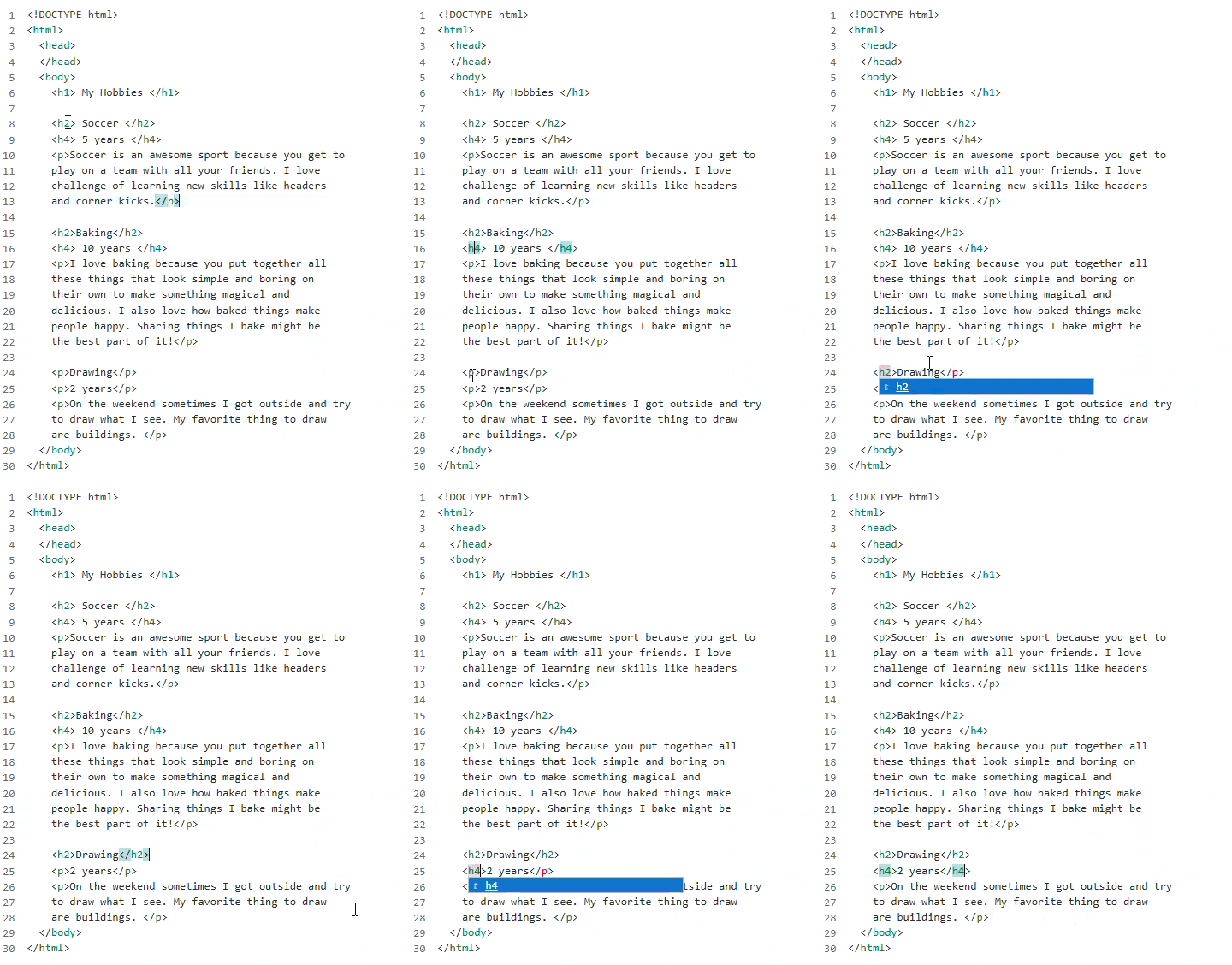\r\n:::\r\n\r\n::: details [**Help and Tips**]\r\n- [<i class=\"fa-regular fa-map\"></i> Headings and Paragraphs](https://levelbuilder-studio.code.org/courses/csd-2024/guides/headings-and-paragraphs)\r\n- [<i class=\"fa-solid fa-book\"></i> HTML Tags](https://levelbuilder-studio.code.org/courses/csd-2024/guides/html-tags)\r\n:::", | ||
| "long_instructions": "# Headings\r\n\r\nSo far, you've organized your content into paragraphs. Another way HTML allows you to organize your code is by using **headings**. A heading is a short piece of text that goes at the top of a section of content, like a title.\r\n\r\n# Do This:\r\n\r\n1) Find the headings in the web page below. Use Inspect elements to learn about the code that makes them.\r\n2) Make sure you and your partner agree on what the tags do.\r\n3) Change the code so that \"Drawing\" and \"2 years\" match the headings on the rest of the page.\r\n\r\n::: details [🔎 **Show Me How** 🔍]\r\n\r\n\r\n:::\r\n\r\n::: details [**Help and Tips**]\r\n- [<i class=\"fa-regular fa-map\"></i> Headings and Paragraphs](https://levelbuilder-studio.code.org/courses/csd-2024/guides/headings-and-paragraphs)\r\n- [<i class=\"fa-solid fa-book\"></i> HTML Tags](https://levelbuilder-studio.code.org/courses/csd-2024/guides/html-tags)\r\n:::", |
There was a problem hiding this comment.
Minimal diff for properties.long_instructions:
- ...  and use AI Tutor to learn about the code that makes them.
+ ... . Use Inspect elements to learn about the code that makes them.| "properties": { | ||
| "encrypted": "false", | ||
| "long_instructions": "# Headings\r\n\r\nSo far, you've organized your content into paragraphs. Another way HTML allows you to organize your code is by using **headings**. A heading is a short piece of text that goes at the top of a section of content, like a title.\r\n\r\n# Do This:\r\n\r\n1) Find the headings in the web page below and use AI Tutor to learn about the code that makes them.\r\n2) Make sure you and your partner agree on what the tags do.\r\n3) Change the code so that \"Drawing\" and \"2 years\" match the headings on the rest of the page.\r\n\r\n::: details [🔎 **Show Me How** 🔍]\r\n\r\n\r\n:::\r\n\r\n::: details [**Help and Tips**]\r\n- [<i class=\"fa-regular fa-map\"></i> Headings and Paragraphs](https://levelbuilder-studio.code.org/courses/csd-2024/guides/headings-and-paragraphs)\r\n- [<i class=\"fa-solid fa-book\"></i> HTML Tags](https://levelbuilder-studio.code.org/courses/csd-2024/guides/html-tags)\r\n:::", | ||
| "long_instructions": "# Headings\r\n\r\nSo far, you've organized your content into paragraphs. Another way HTML allows you to organize your code is by using **headings**. A heading is a short piece of text that goes at the top of a section of content, like a title.\r\n\r\n# Do This:\r\n\r\n1) Find the headings in the web page below. Use Inspect elements to learn about the code that makes them.\r\n2) Make sure you and your partner agree on what the tags do.\r\n3) Change the code so that \"Drawing\" and \"2 years\" match the headings on the rest of the page.\r\n\r\n::: details [🔎 **Show Me How** 🔍]\r\n\r\n\r\n:::\r\n\r\n::: details [**Help and Tips**]\r\n- [<i class=\"fa-regular fa-map\"></i> Headings and Paragraphs](https://levelbuilder-studio.code.org/courses/csd-2024/guides/headings-and-paragraphs)\r\n- [<i class=\"fa-solid fa-book\"></i> HTML Tags](https://levelbuilder-studio.code.org/courses/csd-2024/guides/html-tags)\r\n:::", |
There was a problem hiding this comment.
Minimal diff for properties.long_instructions:
- ...  and use AI Tutor to learn about the code that makes them.
+ ... . Use Inspect elements to learn about the code that makes them.| "properties": { | ||
| "encrypted": "false", | ||
| "long_instructions": "<img src=\"https://images.code.org/762022f97a355dd63dce5ecc8d0127aa-image-1493161154608.58.15 PM.png\" style=\"width:100px; float:right; margin-left: 20px;\">\r\n\r\n# Heading Sizes\r\n\r\n\r\nHeadings can come in different sizes. In this page, there are six different sized headings, but they are all mixed up. Can you and your partner figure out how to fix them?\r\n\r\n# Do This:\r\n1) Use AI Tutor to figure out what makes the headings different sizes\r\n2) Make sure you and your partner agree on what the different heading tags do.\r\n3) Change the tags so that the headings are in order from biggest to smallest, and the text says the correct size, as in the picture to the right. \r\n\r\n::: details [🔎 **Show Me How To Get Started** 🔍]\r\n\r\n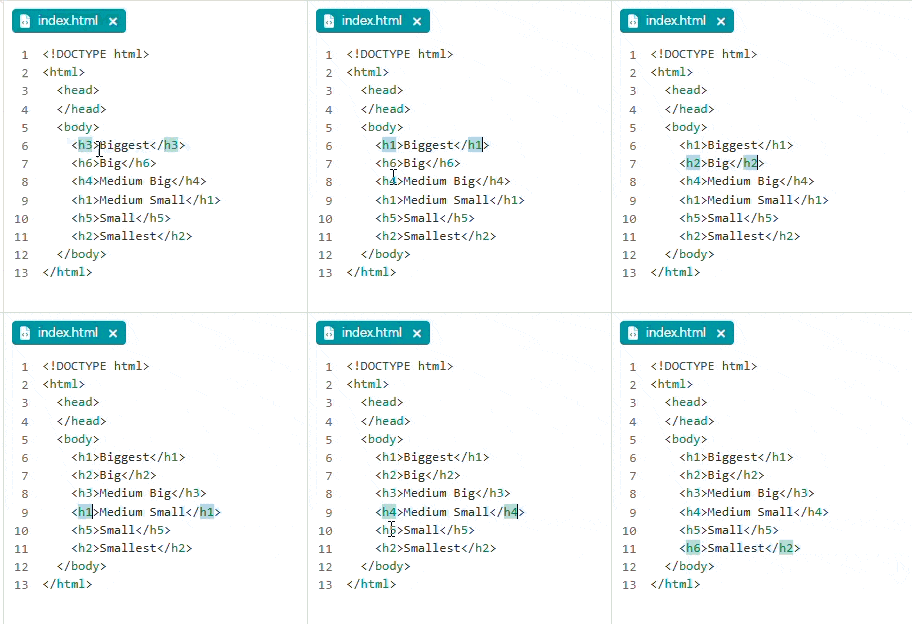\r\n:::\r\n\r\n::: details [Help & Tips]\r\n- [<i class=\"fa-regular fa-map\"></i> Headings and Paragraphs](https://studio.code.org/courses/csd-2024/guides/headings-and-paragraphs)\r\n- [<i class=\"fa-solid fa-book\"></i> HTML Tags](https://studio.code.org/courses/csd-2024/guides/html-tags)\r\n:::", | ||
| "long_instructions": "<img src=\"https://images.code.org/762022f97a355dd63dce5ecc8d0127aa-image-1493161154608.58.15 PM.png\" style=\"width:100px; float:right; margin-left: 20px;\">\r\n\r\n# Heading Sizes\r\n\r\n\r\nHeadings can come in different sizes. In this page, there are six different sized headings, but they are all mixed up. Can you and your partner figure out how to fix them?\r\n\r\n# Do This:\r\n1) Use Inspect elements to figure out what makes the headings different sizes.\r\n2) Make sure you and your partner agree on what the different heading tags do.\r\n3) Change the tags so that the headings are in order from biggest to smallest, and the text says the correct size, as in the picture to the right. \r\n\r\n::: details [🔎 **Show Me How To Get Started** 🔍]\r\n\r\n\r\n:::\r\n\r\n::: details [Help & Tips]\r\n- [<i class=\"fa-regular fa-map\"></i> Headings and Paragraphs](https://studio.code.org/courses/csd-2024/guides/headings-and-paragraphs)\r\n- [<i class=\"fa-solid fa-book\"></i> HTML Tags](https://studio.code.org/courses/csd-2024/guides/html-tags)\r\n:::", |
There was a problem hiding this comment.
Minimal diff for properties.long_instructions:
- ... AI Tutor to figure out what makes the headings different sizes
+ ... Inspect elements to figure out what makes the headings different sizes...| "properties": { | ||
| "encrypted": "false", | ||
| "long_instructions": "<img src=\"https://images.code.org/762022f97a355dd63dce5ecc8d0127aa-image-1493161154608.58.15 PM.png\" style=\"width:100px; float:right; margin-left: 20px;\">\r\n\r\n# Heading Sizes\r\n\r\n\r\nHeadings can come in different sizes. In this page, there are six different sized headings, but they are all mixed up. Can you and your partner figure out how to fix them?\r\n\r\n# Do This:\r\n1) Use AI Tutor to figure out what makes the headings different sizes\r\n2) Make sure you and your partner agree on what the different heading tags do.\r\n3) Change the tags so that the headings are in order from biggest to smallest, and the text says the correct size, as in the picture to the right. \r\n\r\n::: details [🔎 **Show Me How To Get Started** 🔍]\r\n\r\n\r\n:::\r\n\r\n::: details [Help & Tips]\r\n- [<i class=\"fa-regular fa-map\"></i> Headings and Paragraphs](https://studio.code.org/courses/csd-2024/guides/headings-and-paragraphs)\r\n- [<i class=\"fa-solid fa-book\"></i> HTML Tags](https://studio.code.org/courses/csd-2024/guides/html-tags)\r\n:::", | ||
| "long_instructions": "<img src=\"https://images.code.org/762022f97a355dd63dce5ecc8d0127aa-image-1493161154608.58.15 PM.png\" style=\"width:100px; float:right; margin-left: 20px;\">\r\n\r\n# Heading Sizes\r\n\r\n\r\nHeadings can come in different sizes. In this page, there are six different sized headings, but they are all mixed up. Can you and your partner figure out how to fix them?\r\n\r\n# Do This:\r\n1) Use Inspect elements to figure out what makes the headings different sizes.\r\n2) Make sure you and your partner agree on what the different heading tags do.\r\n3) Change the tags so that the headings are in order from biggest to smallest, and the text says the correct size, as in the picture to the right. \r\n\r\n::: details [🔎 **Show Me How To Get Started** 🔍]\r\n\r\n\r\n:::\r\n\r\n::: details [Help & Tips]\r\n- [<i class=\"fa-regular fa-map\"></i> Headings and Paragraphs](https://studio.code.org/courses/csd-2024/guides/headings-and-paragraphs)\r\n- [<i class=\"fa-solid fa-book\"></i> HTML Tags](https://studio.code.org/courses/csd-2024/guides/html-tags)\r\n:::", |
There was a problem hiding this comment.
Minimal diff for properties.long_instructions:
- ... AI Tutor to figure out what makes the headings different sizes
+ ... Inspect elements to figure out what makes the headings different sizes...
| "properties": { | ||
| "encrypted": "false", | ||
| "long_instructions": "*This level follows a video that you may have watched with your class. If you missed the video, you can watch it in the Help and Tips tab of this level.*\r\n\r\n# Debug: Missing Paragraph\r\n\r\nSomeone has submitted a bug report on this web page. Can you fix the bug?\r\n\r\n\r\n\r\n# Do this\r\n\r\n1) Find and fix the problem that is causing the bug", | ||
| "long_instructions": "*This level follows a video that you may have watched with your class. If you missed the video, you can watch [here](https://youtu.be/Hjl6gbg9kmk).*\r\n\r\n# Debug: Missing Paragraph\r\n\r\nSomeone has submitted a bug report on this web page. Can you fix the bug?\r\n\r\n\r\n\r\n# Do this\r\n\r\n1) Find and fix the problem that is causing the bug.", |
There was a problem hiding this comment.
Minimal diff for properties.long_instructions:
- ... it in the Help and Tips tab of this level.*
+ ... [here](https://youtu.be/Hjl6gbg9kmk).*
- ...
+ ... .| "properties": { | ||
| "encrypted": "false", | ||
| "long_instructions": "*This level follows a video that you may have watched with your class. If you missed the video, you can watch it in the Help and Tips tab of this level.*\r\n\r\n# Debug: Missing Paragraph\r\n\r\nSomeone has submitted a bug report on this web page. Can you fix the bug?\r\n\r\n\r\n\r\n# Do this\r\n\r\n1) Find and fix the problem that is causing the bug", | ||
| "long_instructions": "*This level follows a video that you may have watched with your class. If you missed the video, you can watch [here](https://youtu.be/Hjl6gbg9kmk).*\r\n\r\n# Debug: Missing Paragraph\r\n\r\nSomeone has submitted a bug report on this web page. Can you fix the bug?\r\n\r\n\r\n\r\n# Do this\r\n\r\n1) Find and fix the problem that is causing the bug.", |
There was a problem hiding this comment.
Minimal diff for properties.long_instructions:
- ... it in the Help and Tips tab of this level.*
+ ... [here](https://youtu.be/Hjl6gbg9kmk).*
- ...
+ ... .| "encrypted": "false", | ||
| "display_name": "Debug: Headings", | ||
| "long_instructions": "# Debug: Headings\r\n\r\nThere are a few issues with this page's headings. Can you fix them?\r\n\r\n# Do This\r\n1) Fix all of the pink errors.\r\n- Adjust the heading tags to be the appropriate size, if necessary.\r\n", | ||
| "long_instructions": "# Debug: Headings\r\n\r\nThere are a few issues with this page's headings. Can you fix them?\r\n\r\n# Do This\r\n1) Fix all of the HTML errors.\r\n- Adjust the heading tags to be the appropriate size, if necessary.\r\n", |
There was a problem hiding this comment.
Minimal diff for properties.long_instructions:
- ... pink errors.
+ ... HTML errors.| "encrypted": "false", | ||
| "display_name": "Debug: Headings", | ||
| "long_instructions": "# Debug: Headings\r\n\r\nThere are a few issues with this page's headings. Can you fix them?\r\n\r\n# Do This\r\n1) Fix all of the pink errors.\r\n- Adjust the heading tags to be the appropriate size, if necessary.\r\n", | ||
| "long_instructions": "# Debug: Headings\r\n\r\nThere are a few issues with this page's headings. Can you fix them?\r\n\r\n# Do This\r\n1) Fix all of the HTML errors.\r\n- Adjust the heading tags to be the appropriate size, if necessary.\r\n", |
There was a problem hiding this comment.
Minimal diff for properties.long_instructions:
- ... pink errors.
+ ... HTML errors.| "encrypted": "false", | ||
| "display_name": "Debug missing heading css", | ||
| "long_instructions": "# Debug: Missing Heading Style\r\n\r\n\r\n\r\n \r\n# Do this\r\n1) Find and fix the problem that is causing the bug\r\n\r\n::: details [Help & Tips]\r\n- [<i class=\"fa-regular fa-map\"></i> Style Sheets](https://studio.code.org/courses/csd-2024/guides/style-sheets)\r\n- [<i class=\"fa-solid fa-book\"></i> Text Properties](https://studio.code.org/courses/csd-2024/guides/text-properties)\r\n- [<i class=\"fa-solid fa-book\"></i> Formatting HTML](https://studio.code.org/courses/csd-2024/guides/formatting-html)\r\n- [<i class=\"fa-solid fa-book\"></i> Lists](https://studio.code.org/courses/csd-2024/guides/lists)\r\n- [<i class=\"fa-solid fa-book\"></i> Headings and Paragraphs](https://studio.code.org/courses/csd-2024/guides/headings-and-paragraphs)\r\n- [<i class=\"fa-solid fa-book\"></i> HTML Tags](https://studio.code.org/courses/csd-2024/guides/html-tags)\r\n- [<i class=\"fa-solid fa-book\"></i> Debugging in HTML](https://studio.code.org/courses/csd-2022/guides/debugging-html)\r\n\r\n:::", | ||
| "long_instructions": "# Debug: Missing Heading Style\r\n\r\n\r\n\r\n \r\n# Do this\r\n1) Find and fix the problem that is causing the bug.\r\n\r\n::: details [Help & Tips]\r\n- [<i class=\"fa-regular fa-map\"></i> Style Sheets](https://studio.code.org/courses/csd-2024/guides/style-sheets)\r\n- [<i class=\"fa-solid fa-book\"></i> Text Properties](https://studio.code.org/courses/csd-2024/guides/text-properties)\r\n- [<i class=\"fa-solid fa-book\"></i> Formatting HTML](https://studio.code.org/courses/csd-2024/guides/formatting-html)\r\n- [<i class=\"fa-solid fa-book\"></i> Lists](https://studio.code.org/courses/csd-2024/guides/lists)\r\n- [<i class=\"fa-solid fa-book\"></i> Headings and Paragraphs](https://studio.code.org/courses/csd-2024/guides/headings-and-paragraphs)\r\n- [<i class=\"fa-solid fa-book\"></i> HTML Tags](https://studio.code.org/courses/csd-2024/guides/html-tags)\r\n- [<i class=\"fa-solid fa-book\"></i> Debugging in HTML](https://studio.code.org/courses/csd-2022/guides/debugging-html)\r\n\r\n:::", |
There was a problem hiding this comment.
Minimal diff for properties.long_instructions:
- ...
+ ... .| "name": "index.html", | ||
| "language": "html", | ||
| "contents": "<!DOCTYPE html>\n<html>\n <head>\n </head>\n <body>\n <!-- info on gymnastics -->\n <!-- 1) Add an image link for the image \"gymnast.gif\" -->\n <p>Gymnastics involves balance, strength, flexibility, and coordination. Events for women include the vault, uneven bars, balance beam, and floor. Events for men are vault, parallel bars, floor, pummel horse, and still rings. \n <br> \n <br>\n Image by Rolf Dober from German Wikipedia</p>\n \n </body>\n</html>", | ||
| "contents": "<!DOCTYPE html>\n<html>\n <head>\n </head>\n <body>\n <!-- info on Gymnastics -->\n <!-- 1) Add an image link for the image \"gymnast.gif\" -->\n <p>Gymnastics involves balance, strength, flexibility, and coordination. Events for women include the vault, uneven bars, balance beam, and floor. Events for men are vault, parallel bars, floor, pummel horse, and still rings. \n <br> \n <br>\n Image by Rolf Dober from German Wikipedia</p>\n \n </body>\n</html>", |
There was a problem hiding this comment.
Minimal diff for properties.start_sources.files.1.contents:
- ... gymnastics -->
+ ... Gymnastics -->| "encrypted": "false", | ||
| "display_name": "Add image link", | ||
| "long_instructions": "# Add Image Link\r\n\r\nAn image has already been uploaded for you. The next step is to link it to the web page.\r\n\r\n# Do This\r\n1) Add an image link for the image \"gymnast.gif\".\r\n\r\n::: details [🔎 **Show Me How** 🔍]\r\n\r\n<img src=\"https://images.code.org/de0868aea055a3c42a4a4371892c2b93-image-1677104053660.gif\" style=\"width:500px\">\r\n:::\r\n\r\n::: details [Help & Tips]\r\n- [<i class=\"fa-regular fa-map\"></i> Images in HTML](https://studio.code.org/courses/csd-2024/guides/images-in-html)\r\n- [<i class=\"fa-solid fa-book\"></i> Creative Commons Search](https://studio.code.org/courses/csd-2024/guides/creative-commons-search)\r\n- [<i class=\"fa-solid fa-book\"></i> Style Sheets](https://studio.code.org/courses/csd-2024/guides/style-sheets)\r\n- [<i class=\"fa-solid fa-book\"></i> Text Properties](https://studio.code.org/courses/csd-2024/guides/text-properties)\r\n- [<i class=\"fa-solid fa-book\"></i> Formatting HTML](https://studio.code.org/courses/csd-2024/guides/formatting-html)\r\n- [<i class=\"fa-solid fa-book\"></i> Lists](https://studio.code.org/courses/csd-2024/guides/lists)\r\n- [<i class=\"fa-solid fa-book\"></i> Headings and Paragraphs](https://studio.code.org/courses/csd-2024/guides/headings-and-paragraphs)\r\n- [<i class=\"fa-solid fa-book\"></i> HTML Tags](https://studio.code.org/courses/csd-2024/guides/html-tags)\r\n- [<i class=\"fa-solid fa-book\"></i> Debugging in HTML](https://studio.code.org/courses/csd-2022/guides/debugging-html)\r\n:::\r\n\r\n![]()", | ||
| "long_instructions": "# Add ImaGe Link\r\n\r\nAn image has already been uploaded for you. The next step is to link it to the web page.\r\n\r\n# Do This\r\n1) Add an image link for the image \"gymnast.gif\".\r\n\r\n::: details [🔎 **Show Me How** 🔍]\r\n\r\n<img src=\"https://images.code.org/de0868aea055a3c42a4a4371892c2b93-image-1677104053660.gif\" style=\"width:500px\">\r\n:::\r\n\r\n::: details [Help & Tips]\r\n- [<i class=\"fa-regular fa-map\"></i> Images in HTML](https://studio.code.org/courses/csd-2024/guides/images-in-html)\r\n- [<i class=\"fa-solid fa-book\"></i> Creative Commons Search](https://studio.code.org/courses/csd-2024/guides/creative-commons-search)\r\n- [<i class=\"fa-solid fa-book\"></i> Style Sheets](https://studio.code.org/courses/csd-2024/guides/style-sheets)\r\n- [<i class=\"fa-solid fa-book\"></i> Text Properties](https://studio.code.org/courses/csd-2024/guides/text-properties)\r\n- [<i class=\"fa-solid fa-book\"></i> Formatting HTML](https://studio.code.org/courses/csd-2024/guides/formatting-html)\r\n- [<i class=\"fa-solid fa-book\"></i> Lists](https://studio.code.org/courses/csd-2024/guides/lists)\r\n- [<i class=\"fa-solid fa-book\"></i> Headings and Paragraphs](https://studio.code.org/courses/csd-2024/guides/headings-and-paragraphs)\r\n- [<i class=\"fa-solid fa-book\"></i> HTML Tags](https://studio.code.org/courses/csd-2024/guides/html-tags)\r\n- [<i class=\"fa-solid fa-book\"></i> Debugging in HTML](https://studio.code.org/courses/csd-2022/guides/debugging-html)\r\n:::\r\n\r\n![]()", |
There was a problem hiding this comment.
Minimal diff for properties.long_instructions:
- ... ge Link
+ ... Ge Link| "name": "index.html", | ||
| "language": "html", | ||
| "contents": "<!DOCTYPE html>\n<html>\n <head>\n </head>\n <body>\n <!-- info on gymnastics -->\n <!-- 1) Add an image link for the image \"gymnast.gif\" -->\n <p>Gymnastics involves balance, strength, flexibility, and coordination. Events for women include the vault, uneven bars, balance beam, and floor. Events for men are vault, parallel bars, floor, pummel horse, and still rings. \n <br> \n <br>\n Image by Rolf Dober from German Wikipedia</p>\n \n </body>\n</html>", | ||
| "contents": "<!DOCTYPE html>\n<html>\n <head>\n </head>\n <body>\n <!-- info on Gymnastics -->\n <!-- 1) Add an image link for the image \"gymnast.gif\" -->\n <p>Gymnastics involves balance, strength, flexibility, and coordination. Events for women include the vault, uneven bars, balance beam, and floor. Events for men are vault, parallel bars, floor, pummel horse, and still rings. \n <br> \n <br>\n Image by Rolf Dober from German Wikipedia</p>\n \n </body>\n</html>", |
There was a problem hiding this comment.
Minimal diff for properties.start_sources.files.1.contents:
- ... gymnastics -->
+ ... Gymnastics -->| "display_name": "Add to your Web Page!", | ||
| "project_template_level_name": "CSD U2L6-L3-template_2025-v2", | ||
| "long_instructions": "# Add to your CSS Webpage\r\n\r\nUse your new knowledge and skills to add to the page you started in Lesson 6. The webpage you created about something you enjoy in Level 11, challenge f has been transferred below - add some style to your images!", | ||
| "long_instructions": "# Add CSS to Your Web Page\r\n\r\nUse your new knowledge and skills to add to the page you started in Lesson 6. The web page you created about something you enjoy in Lesson 6 has been transferred below. Add some style to your images!", |
There was a problem hiding this comment.
Minimal diff for properties.long_instructions:
- ... to your CSS Webpage
+ ... CSS to Your Web Page
- ... page you created about something you enjoy in Le...
+ ... page you created about something you enjoy in Le...| "display_name": "Add to your Web Page!", | ||
| "project_template_level_name": "CSD U2L6-L3-template_2026", | ||
| "long_instructions": "# Add to your CSS Webpage\r\n\r\nUse your new knowledge and skills to add to the page you started in Lesson 6. The webpage you created about something you enjoy in Level 11, challenge f has been transferred below - add some style to your images!", | ||
| "long_instructions": "# Add CSS to Your Web Page\r\n\r\nUse your new knowledge and skills to add to the page you started in Lesson 6. The web page you created about something you enjoy in Lesson 6 has been transferred below. Add some style to your images!", |
There was a problem hiding this comment.
Minimal diff for properties.long_instructions:
- ... to your CSS Webpage
+ ... CSS to Your Web Page
- ... page you created about something you enjoy in Le...
+ ... page you created about something you enjoy in Le... ebeastlake
force-pushed
the
task/csd2-weblab2-copy-source-fixes
branch
from
ebeastlake
force-pushed
the
task/csd2-weblab2-copy-source-fixes
branch
from
cd7ad72 to
97e5084
Compare
1 participant

Summary
csd-2026Unit 2 (csd2-2026,*_2025-v2) and the single-unit siblingweb-development-2026(*_2026).Testing
.levelfiles as JSON from their CDATA payloads.git diff --check -- dashboard/config/levels/custom/weblab2/courses/csd-2026/units/2maps tocsd2-2026indashboard/config/courses/csd-2026.course.csd2-2026andweb-development-2026: same script-level structure; separate paired level records.