Skip to content

fix crashing on Catalina - #4

Open
shincurry wants to merge 2 commits into
jjgod:masterfrom
shincurry:fix/catalina-crash
Open

fix crashing on Catalina#4
shincurry wants to merge 2 commits into
jjgod:masterfrom
shincurry:fix/catalina-crash

Conversation

@shincurry

Copy link
Copy Markdown

ENV: Xcode 11.3.1 (11C504) Catalina 10.15.3 (19D76)

For unkown reason, [pboard propertyListForType: NSPasteboardTypeFileURL] returns an NSString(NSCFString) directly instead of an NSArray.

it cause DictUnifier can't get correct file url.

@MoeClub

MoeClub commented Feb 7, 2020

Copy link
Copy Markdown

It can not open dict file.

Step 1

brew install glib

Step 2

Run xcode

2020-02-07 1 40 07

@shincurry

Copy link
Copy Markdown
Author

you can use it by dragging a dictionary data file.tar.bz2 into the app window.

Menu -> FIle -> Open... not clickable seems to be another bug from original master branch?🤔

@MoeClub

MoeClub commented Feb 7, 2020

Copy link
Copy Markdown

Drag operation is invalid.

It seems to be another bug.

Alternative: You can release the latest compiled version.

@shincurry

Copy link
Copy Markdown
Author

2020-02-07 19-39-21 2020-02-07 19_40_39

@shincurry

Copy link
Copy Markdown
Author

there is a chance that the operation will fail, the reason is because this application has two DragAndDrop callbacks, which are located in DUWindow and DUImageView, i just only fix bug in DUWindow, missed in DUImageView.

@shincurry

Copy link
Copy Markdown
Author

need test in previous macOS version

@MoeClub

MoeClub commented Feb 8, 2020

Copy link
Copy Markdown

Well!!! It is work.
But Menu -> FIle -> Open... not clickable.

@daimon99

daimon99 commented Feb 9, 2020

Copy link
Copy Markdown

DictUnifier.zip
The release of Catalina build version. It is ok with my mac Catalina 10.15.3 (19D76) version.

@KingofAsianPopJC

Copy link
Copy Markdown

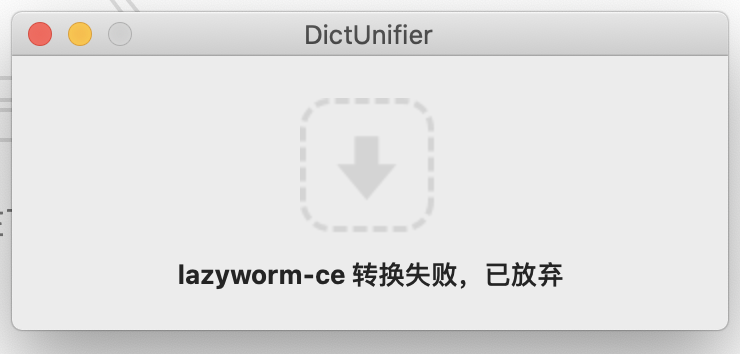
@daimon99 Hello,My MacBook Pro are Catalina 10.15.3 as yours, and downloaded your release of DictUnifier, the crash problem in drawing file was solved. However, a new error is any tar.bz2 file was failed to convert and the software give up for converting.
image

@shincurry

shincurry commented Feb 13, 2020

Copy link
Copy Markdown
Author

@KingofAsianPopJC
I noticed in use that some dictionary files fail to convert, try other ones http://download.huzheng.org/zh_CN/

maybe we should create another branch pull request to fix this convert-failed problem.
current pull request focused on fixing file open crash issue.

@KingofAsianPopJC

Copy link
Copy Markdown

@shincurry Thanks for your reply! I downloaded 8 dictionary from http://download.huzheng.org/zh_CN/, but all of them failed to be converted and all of them were English-Chinese dictionarys. Other dictionaries in this website are not suitable for me in use.

@shincurry

Copy link
Copy Markdown
Author

截屏2020-02-13下午12 21 52

i have converted 4 dictionaries successfully.

@KingofAsianPopJC

@chiaaaa96

Copy link
Copy Markdown
截屏2020-02-13下午12 21 52

i have converted 4 dictionaries successfully.

@KingofAsianPopJC

您好,請問一下是否能提供「计算机词汇 」的文件呢?
本身沒有任何程式編寫經驗,因看了您的文章後成功修復了DictUnifier的bug,謝謝您!

@shincurry shincurry changed the title fix Catalina crash fix crashing on Catalina Feb 19, 2020
@qfdk

qfdk commented Mar 4, 2020

Copy link
Copy Markdown

@KingofAsianPopJC Try to install glib with this commande brew install glib
I got the same problem after installing glib, it works

@0x1b2c

0x1b2c commented Mar 11, 2020

Copy link
Copy Markdown

Using this fix I have successfully converted Collins COBUILD Advanced Learner's Dictionary 2006 from http://download.huzheng.org/dict.org/ . However, query a word will result a "Format not supported" error message in Dictionary app.

image

macOS version is 10.15.2.

@samhsu-dev

Copy link
Copy Markdown

Good job, mate. It is really helpful :)

@JohnnieFucker

Copy link
Copy Markdown

DictUnifier.zip
The release of Catalina build version. It is ok with my mac Catalina 10.15.3 (19D76) version.

that works for me,thanks

@RigelXi

RigelXi commented Apr 5, 2020

Copy link
Copy Markdown

@KingofAsianPopJC Try to install glib with this commande brew install glib
I got the same problem after installing glib, it works

@qfdk I input "brew install glib" in the terminal, but it says "command not found".

@qfdk

qfdk commented Apr 6, 2020

Copy link
Copy Markdown

@RigelXi You need to install brew with this command

/bin/bash -c "$(curl -fsSL https://raw.githubusercontent.com/Homebrew/install/master/install.sh)"

Then you can use brew command to install glib

@xiao-zang

Copy link
Copy Markdown

Using this fix I have successfully converted Collins COBUILD Advanced Learner's Dictionary 2006 from http://download.huzheng.org/dict.org/ . However, query a word will result a "Format not supported" error message in Dictionary app.

image

macOS version is 10.15.2.

I have the same problem with the Merriam-Webster's Collegiate Dictionary in http://download.huzheng.org/bigdict/
Anyone has fix for this "Format not supported" issue?

@xiao-zang

Copy link
Copy Markdown

Using this fix I have successfully converted Collins COBUILD Advanced Learner's Dictionary 2006 from http://download.huzheng.org/dict.org/ . However, query a word will result a "Format not supported" error message in Dictionary app.
image
macOS version is 10.15.2.

I have the same problem with the Merriam-Webster's Collegiate Dictionary in http://download.huzheng.org/bigdict/
Anyone has fix for this "Format not supported" issue?

朗道英汉词典5.0 works me,but Merriam Webster's Collegiate Dictionaries in "http://download.huzheng.org/bigdict/" and in "http://download.huzheng.org/babylon/english/" both show "Format not supported" error message in dictionary app, as @rainux commented.

@ritou11

ritou11 commented Apr 24, 2020

Copy link
Copy Markdown

@xiao-zang I read the codes these days and found that some formats had never been supported by the author.

case 'h':
p++;
sec_size = strlen(p) + 1;
g_string_append(dest,
"<p class=\"error\">Format not supported.</p>");
break;

Considering the latest commit was about 2 years ago, I believe this repo is no more maintained. So the answer is: No fix.

@xiao-zang

xiao-zang commented Apr 24, 2020

Copy link
Copy Markdown

@xiao-zang I read the codes these days and found that some formats had never been supported by the author.

case 'h':
p++;
sec_size = strlen(p) + 1;
g_string_append(dest,
"<p class=\"error\">Format not supported.</p>");
break;

Considering the latest commit was about 2 years ago, I believe this repo is no more maintained. So the answer is: No fix.

Thank you for the quick comment! @ritou11
It is disappointing though, as I feel Merriam-Webster has the most comprehensive definitions for some words. For example, if you look up "overhang" in https://www.merriam-webster.com/dictionary/overhang, the 4th definition of the noun is not listed in almost any other dictionary.

@ritou11

ritou11 commented Apr 29, 2020

Copy link
Copy Markdown

@xiao-zang Maybe you could try my repo dictconv these days. It's built using Node.js based on this repo, but supports type 'h'. Note that dictconv is the very early version and you could provide the link to your stardict by issues if it doesn't work.

@xiao-zang

Copy link
Copy Markdown

@xiao-zang Maybe you could try my repo dictconv these days. It's built using Node.js based on this repo, but supports type 'h'. Note that dictconv is the very early version and you could provide the link to your stardict by issues if it doesn't work.

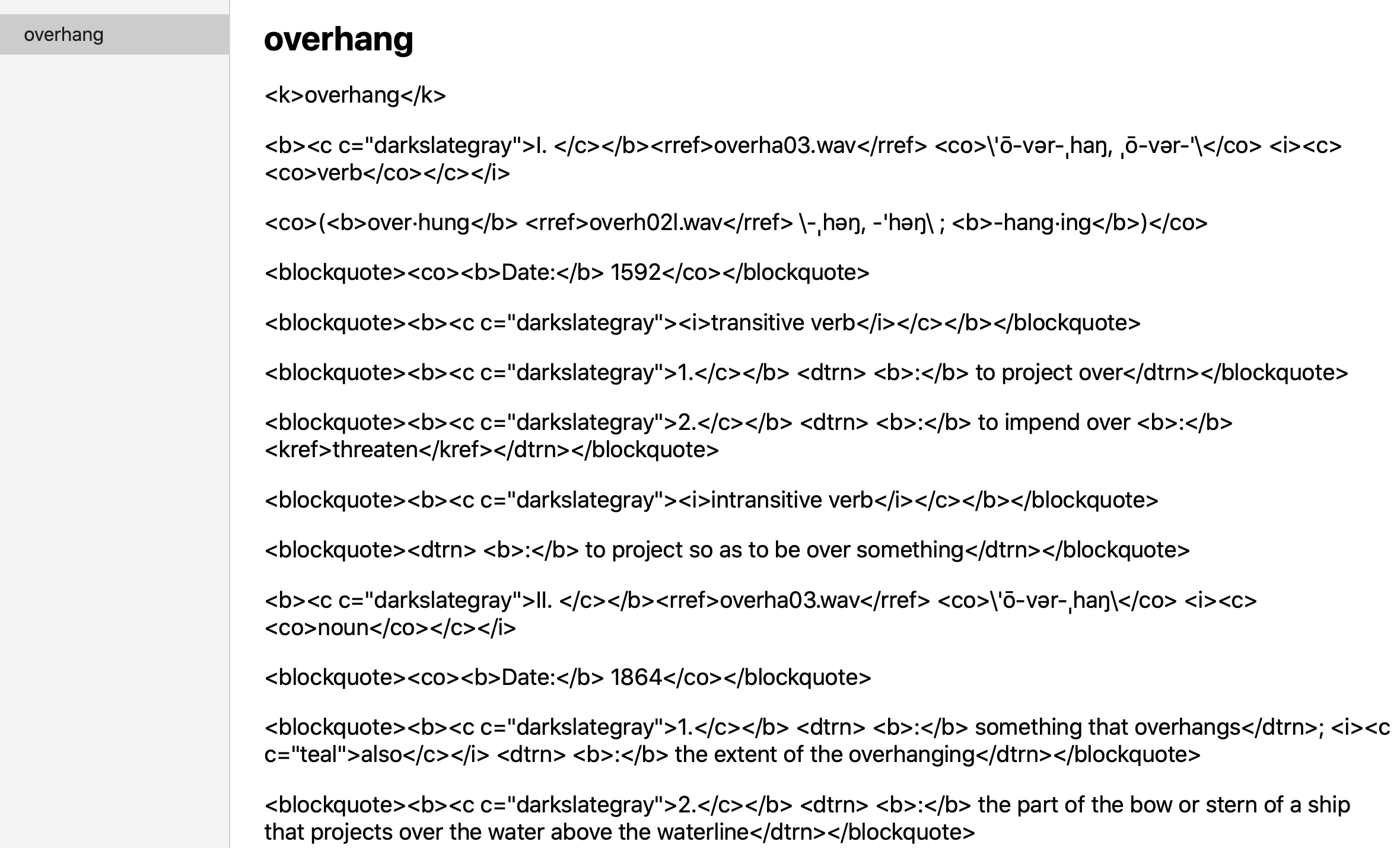
@ritou11 Your dictconv converted http://download.huzheng.org/bigdict/stardict-Merriam-Webster_s_Collegiate_11th_Ed-2.4.2.tar.bz2 successfully, but the resulting dictionary looks like this

image

But thank you anyway!

@Boooom0099

Copy link
Copy Markdown

依然不行🥺试了三个词典。请问有新的办法了吗?Open files依然无法点按……

@zcbenz

zcbenz commented May 6, 2020

Copy link
Copy Markdown

I believe you can fix the crash by replacing NSPasteboardTypeFileURL with NSFilenamesPboardType without other changes.

@FSYtiredtodeath

Copy link
Copy Markdown

DictUnifier.zip
The release of Catalina build version. It is ok with my mac Catalina 10.15.3 (19D76) version.

@daimon99 This one didn't work at first, as it returned "abort" when dragging a stardict into it. The "Open" button was invalid, too.

But after I installed glib using brew install glib, the drag operation works. Though the "Open" button remains invalid.

@yhshu

yhshu commented Jul 19, 2020

Copy link
Copy Markdown

I converted a roughly-8M Oxford English-Chinese dictionary on macOS Catalina 10.15.6 and it cost me about over 12 hours and still not finished, is this normal?

@shincurry

Copy link
Copy Markdown
Author

I converted a roughly-8M Oxford English-Chinese dictionary on macOS Catalina 10.15.6 and it cost me about over 12 hours and still not finished, is this normal?

@lzw429 obviously abnormal.

There are still some bugs in this application that have not been fixed. Currently, only some dictionary files can be converted normally.

@redbar0n

redbar0n commented Sep 3, 2020

Copy link
Copy Markdown

In Catalina (10.15.6), I'm getting this when loading it with a dictionary file[1]:
*** Terminating app due to uncaught exception 'NSInvalidArgumentException', reason: '*** -[NSConcreteTask terminationStatus]: task not launched' abort() called terminating with uncaught exception of type NSException

[1] The file stardict-dictd-web1913-2.4.2.tar.bz2 available at https://s3.amazonaws.com/jsomers/dictionary.zip referenced from https://jsomers.net/blog/dictionary

@redbar0n

redbar0n commented Sep 3, 2020

Copy link
Copy Markdown

It worked with the build from @daimon99 ! Thanks. I hope that build can make it into the releases section, @jjgod .

@redbar0n

redbar0n commented Sep 4, 2020

Copy link
Copy Markdown

Actually.. It always just stopped at "Checking source"...

After running brew install glib (installing glib properly; i.e. completely without errors) then DictUnifier always just stops at Building dictd_www.dict.org_web1913.dictionary. (the latter part is the name of the dictionary).

@redbar0n

redbar0n commented Sep 7, 2020

Copy link
Copy Markdown

I was able to use @daimon99's build of DictUnifier to successfully convert/install the following dictionary, like @chiaaaa96 also managed: stardict-cedict-gb-2.4.2.tar.bz2. So it seems like it might be some incompatibilities with certain dictionaries, like stardict-dictd-web1913-2.4.2.tar.bz2 which makes them unable to be built.

This note from a fork of this repo could give a clue as to why some dictionaries won't build:
"The source dictionary could be in any format, but we only support stardict format at present. The target dictionary must be Dictionary 2.0 format defined in Mac OS X 10.5.". (I am using Dictionary 2.3.0 (239.5) in MacOS Catalina.)

@redbar0n

redbar0n commented Sep 7, 2020

Copy link
Copy Markdown

Was able to install Webster's 1913 dictionary in MacOS Catalina using the precompiled websters-1913.dictionary.zip from https://github.com/ponychicken/WebsterParser. Circumventing the need to use DictUnifier.

For other dictionaries, the build instructions here:
https://github.com/ponychicken/WebsterParser and the instructions in this StackExchange answer, might help tech savvy users, for dictionaries where DictUnifier fails to work.

@lerogo

lerogo commented Oct 25, 2020

Copy link
Copy Markdown

@daimon99 Hello,My MacBook Pro are Catalina 10.15.3 as yours, and downloaded your release of DictUnifier, the crash problem in drawing file was solved. However, a new error is any tar.bz2 file was failed to convert and the software give up for converting.
image

hi~, there is a solution about this.
open your terminal and install brew, so you can install glib
brew install glib
just wait for a minute and then you can drop tar.bz2 file to DictUnifier!

@bryanmanio

Copy link
Copy Markdown

Any upcoming plans for Big Sur support?

@danielsss

Copy link
Copy Markdown

Any upcoming plans for Big Sur support?

It's working on Big Sur 11.1 with Catalina build version

@MorCherlf

Copy link
Copy Markdown

Is it crashing on Apple Silicon?
I can't use it on my M1 MacBook with Catalina build version

@liangxiwei

Copy link
Copy Markdown

DictUnifier.zip
The release of Catalina build version. It is ok with my mac Catalina 10.15.3 (19D76) version.

@daimon99 This one didn't work at first, as it returned "abort" when dragging a stardict into it. The "Open" button was invalid, too.

But after I installed glib using brew install glib, the drag operation works. Though the "Open" button remains invalid.

not work now in Catalia 10.15.5

@2788

2788 commented Aug 16, 2021

Copy link
Copy Markdown

DictUnifier.zip
The release of Catalina build version. It is ok with my mac Catalina 10.15.3 (19D76) version.

It's working on Big Sur 11.5.1. Make sure glib is installed!

@misternian

misternian commented Aug 29, 2021

Copy link
Copy Markdown

DictUnifier.zip
The release of Catalina build version. It is ok with my mac Catalina 10.15.3 (19D76) version.

my macOS is 11.5, it is works for me when i execute

brew glib

tips:

you may execute

brew update

brew upgrade

first

@int-boyu

Copy link
Copy Markdown

@xiao-zang Maybe you could try my repo dictconv these days. It's built using Node.js based on this repo, but supports type 'h'. Note that dictconv is the very early version and you could provide the link to your stardict by issues if it doesn't work.

I have tried dictconv and it works for me. thanks

Sign up for free to join this conversation on GitHub. Already have an account? Sign in to comment

Labels

None yet

Projects

None yet

Development

Successfully merging this pull request may close these issues.